Disclosure: This website uses affiliate links; I may earn commissions at no extra cost to you. Learn more.

Before we jump into the ultimate HubSpot Review that you’ll ever need to read, let me spoil the answer for you:
HubSpot is worth it in 2026 for most growing businesses.
It delivers measurable ROI within 3-6 months through unified customer data and automated workflows.
The integrated platform improves lead conversion rates while streamlining operations.
If you’re in a hurry, there’s your answer. Make sure to give it a go.
And if you have some time to spend to learn about it in detail, let’s get going with the review…
Is your customer data scattered across a dozen different apps? Are your marketing and sales teams operating in silos? If yes, and if you’re looking for a single source of truth to grow your business, you’ve come to the right place.
We’re deep into 2026, and the business landscape, especially in a bustling market like the US and globally, is more competitive than ever.
You need more than just software; you need a strategic partner. A tool that doesn’t just do things, but helps you do the right things.
I’ll break down everything you need to know about the HubSpot platform, from its core philosophy to its intricate pricing, its powerful features, and how you can truly make HubSpot the ultimate weapon of your business.
This isn’t just a list of features; this is a strategic analysis based on years of hands-on experience and deep research, designed to give you the clarity you need to make a confident choice.
HubSpot Review: The Quick Verdict (Is It Worth It In 2026)
Let’s cut right to the chase.
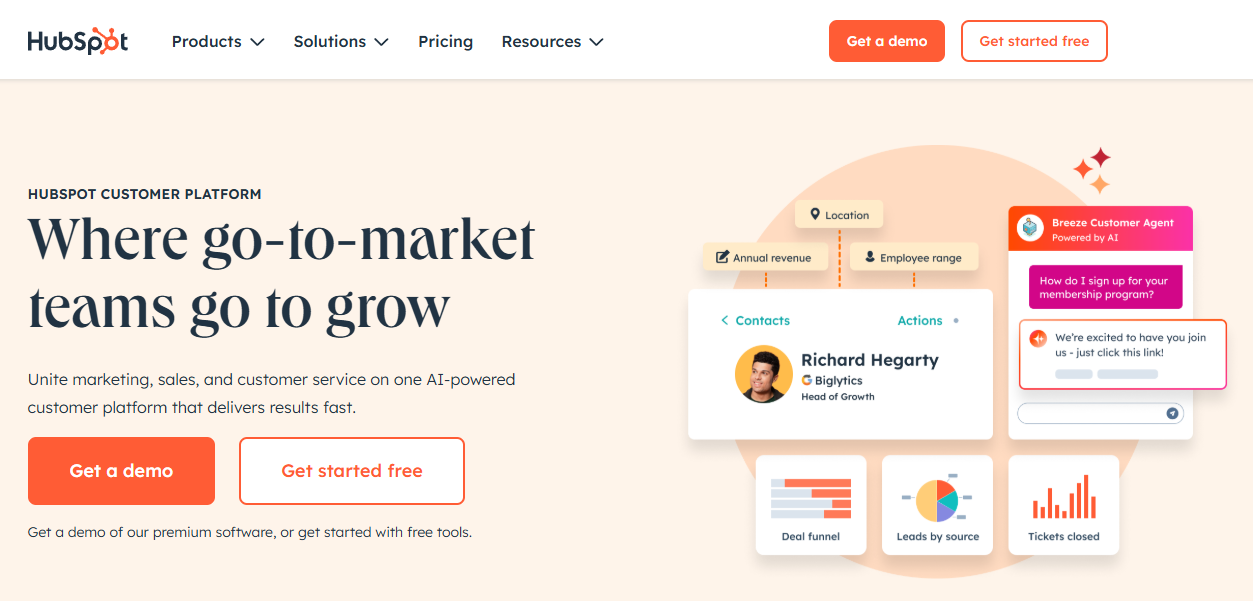
When you’re aiming to grow your business smarter, not harder, HubSpot consistently stands out as an all-in-one customer platform designed to unify your marketing, sales, service, content, data, and commerce efforts.
After reviewing its extensive capabilities and real-world impact, I can tell you that for the vast majority of businesses committed to long-term, sustainable growth, HubSpot is absolutely worth it.
It’s a comprehensive solution that is ideal for small to medium-sized businesses, yet its scalability means that startups, solopreneurs, and even large enterprises can find immense value within its integrated ecosystem.
HubSpot is an investment in a methodology and a system that puts your customer at the center of everything you do.
It’s a commitment to breaking down the silos between your departments and creating a single, seamless experience for your customers, powered by unified data.
Understanding The HubSpot Philosophy: The Inbound Revolution
To truly understand HubSpot, you must first understand the philosophy that drives it: inbound marketing. This isn’t just a buzzword; it’s the bedrock of the entire platform.

HubSpot has carved out a significant share of the marketing automation market, owning almost a third of it.
This isn’t by accident.
It’s largely thanks to its pioneering role in inbound marketing.
Think about the old way of doing things—”outbound.”
This is the world of interruptive TV ads, aggressive cold calls during dinner, and spammy email blasts that everyone hates.
It’s about shouting your message at people and hoping some of it sticks. Outbound marketing operates on the principle of interruption, forcing its way into a potential customer’s day.
Inbound is the opposite.
It’s a revolutionary strategy that shifts focus to attracting customers through helpful, valuable content.
It’s about earning attention, not buying it.
It respects that the modern buyer is in control.
They have the power of Google, social media, and review sites.
They don’t want to be sold to; they want to be educated and empowered to make the best decision.
Imagine you sell high-quality running shoes.
The outbound approach is to run ads targeting anyone who has ever shown a remote interest in fitness.
On the other hand, the inbound approach is to create a blog post titled “The 5 Most Common Running Injuries and How to Prevent Them,” a YouTube video on “Proper Running Form for Beginners,” and a downloadable “Marathon Training Plan.”
Your ideal customers are actively searching for this information.
Imagine them finding you, consuming your content, building trust with your brand because you’ve genuinely helped them, and then willingly entering your sales process because you’ve proven you can solve their problems.
That is the core of HubSpot’s approach.
The company started in 2006 as a simple marketing tool but evolved into a grander vision.
They realized that attracting a customer was only the beginning.
To truly grow, you needed to manage that entire relationship.
So they added a world-class customer relationship management (CRM) system, then powerful sales tools, and finally customer service tools to become an all-in-one solution.
This evolution means HubSpot is now more than just software; it’s a complete customer platform designed to bring structure to the chaos of managing various business functions.
It aligns your teams, ensuring everyone is on the same page, and crucially, it puts the customer journey front and center.
What I’ve found most impressive is how HubSpot scales with you.
You can start with their incredibly generous free tools and grow into the more powerful paid tiers without ever needing to migrate to an entirely new system.
For any business, from a startup in a co-working space in the US to a well-established corporation in Europe, this makes HubSpot a sustainable, long-term solution for growth.
The HubSpot Ecosystem: Hubs, The Smart CRM, And The Flywheel
At the absolute heart of the HubSpot platform is its Smart CRM.
Think of it as the central nervous system or the beating heart of your business data.
It’s the database that connects every single customer interaction, every piece of data, and every team member.
Every other module, or “Hub,” plugs directly into this CRM, creating a single source of truth.
This unified system is what makes HubSpot so powerful.
When your marketing team captures a lead through a blog post, the sales team instantly has the full context of which post they read and what they’re interested in.
When a salesperson closes a deal, the service team can see the entire history of the relationship, avoiding the dreaded, “You’ll have to explain your problem again to a different department.”
This seamless data flow is what turns disjointed departments into a unified, customer-centric growth engine.
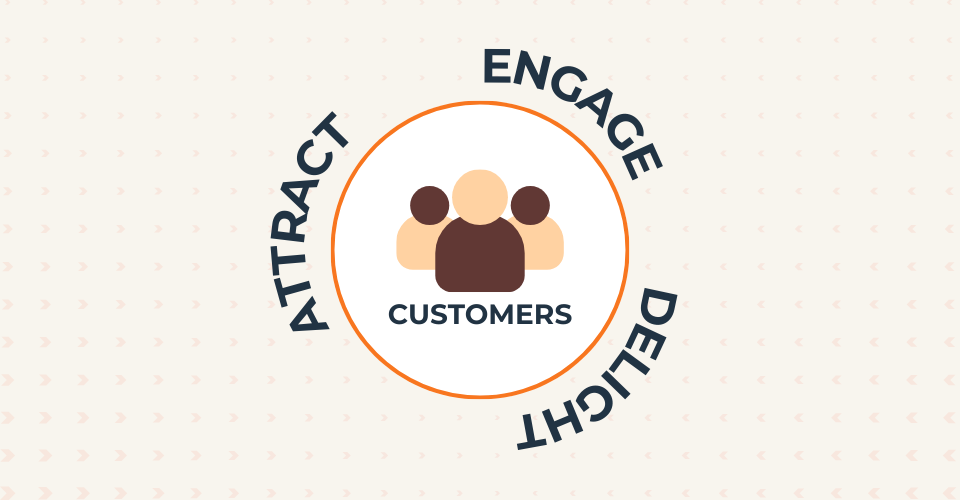
This is the Flywheel model in action, a concept HubSpot champions to replace the traditional sales funnel.
The traditional sales funnel is a leaky bucket; it treats customers as an output.
Once a deal is closed, they fall out the bottom, and the process starts over from scratch.
The Flywheel model flips this idea on its head.
It recognizes that your happiest customers are your single greatest source of new business.
By placing them at the center, it’s a circular model with three phases: Attract, Engage, and Delight.
By using your marketing to attract strangers, your sales process to engage them as customers, and your service to delight them, you create happy customers.
And what do happy customers do?
They become your best marketing channel through word-of-mouth and referrals, adding force back into the flywheel and making it spin faster.
There are currently six main Hubs within the HubSpot Customer Platform:
Marketing Hub: For attracting your audience and turning strangers into leads.
Sales Hub: For engaging prospects and turning leads into customers faster.
Service Hub: For delighting customers and turning them into promoters.
Content Hub (CMS Hub): For powering your website and all your content operations.
Data Hub: For syncing your apps, cleaning your data, and automating business processes.
Commerce Hub: For managing payments, invoices, and subscriptions directly in the CRM.
You can purchase these Hubs individually or, more commonly, as part of a bundled CRM Suite, which often provides better value.
This modular system means you only pay for what you truly need, but I highly recommend getting the entire suite, as most people or businesses will definitely need it.
The Next Evolution: Loop Marketing
As the buyer’s journey has become more fragmented and non-linear, HubSpot has evolved its methodology.
The latest evolution is Loop Marketing, a new approach designed for the modern AI-driven, multi-channel world.
Loop Marketing recognizes that customers no longer follow a straight path.
It focuses on creating a continuous, personalized experience that keeps customers engaged in a seamless loop, no matter where they are in their journey.
This ensures your brand is present and helpful at every touchpoint, strengthening the customer relationship and driving sustained growth.
HubSpot Marketing Hub: Attracting and Nurturing Your Audience
The Marketing Hub is where the inbound journey begins.
It’s where you attract, engage, and nurture your audience, offering a comprehensive suite of tools designed for marketers who want to maximize results, prove ROI, and streamline workflows.
Core Features within HubSpot Marketing Hub
Let’s have a look at the core features that you get with HubSpot as part of their Marketing Hub and how you can benefit from them.
Email Marketing & Automation

This is far more than a simple email blaster like Kit or Moosend. You can craft personalized emails, create and manage complex campaigns, and automate follow-ups based on countless lead interactions.
Use Case Example
Imagine a new lead in New York downloads your eBook on “Digital Marketing Trends.”
With HubSpot, you can automatically trigger a workflow.
This workflow could send a thank-you email instantly, wait three days, send a related case study on how a similar company benefited, and then create a task for a salesperson to follow up if the lead visits your pricing page.
You build this entire sequence using a beautiful, visual drag-and-drop workflow builder that looks like a flowchart.
Pro Tip: Use personalization tokens beyond just the first name. You can pull in their company name, their industry, or even a product they’ve shown interest in to make your automated emails feel incredibly personal.
Best Practice: The free plan allows up to 2,000 email sends per month, but they come with HubSpot branding at the bottom. For a truly professional look, you’ll need the Starter plan.
Landing Pages And Forms

Easily build custom landing pages and forms to capture leads directly into your HubSpot CRM.
Use Case Example
For a new webinar, you can design a compelling landing page using HubSpot’s builder in under an hour.
When a visitor fills out the embedded form, their information automatically creates or updates a contact record in your CRM, tagging them as “Webinar Registrant,” ready for your marketing and sales teams.
Pro Tip: Use the “smart form” feature. If a known contact visits the page, the form can hide fields they’ve already filled out (like first name and email) and ask for new information instead (like company size or biggest challenge), progressively profiling your leads.
Best Practice: While the builder is easy, designers might find it less flexible than dedicated builders like Leadpages unless they are comfortable editing the underlying code or using custom modules.
Social Media Management
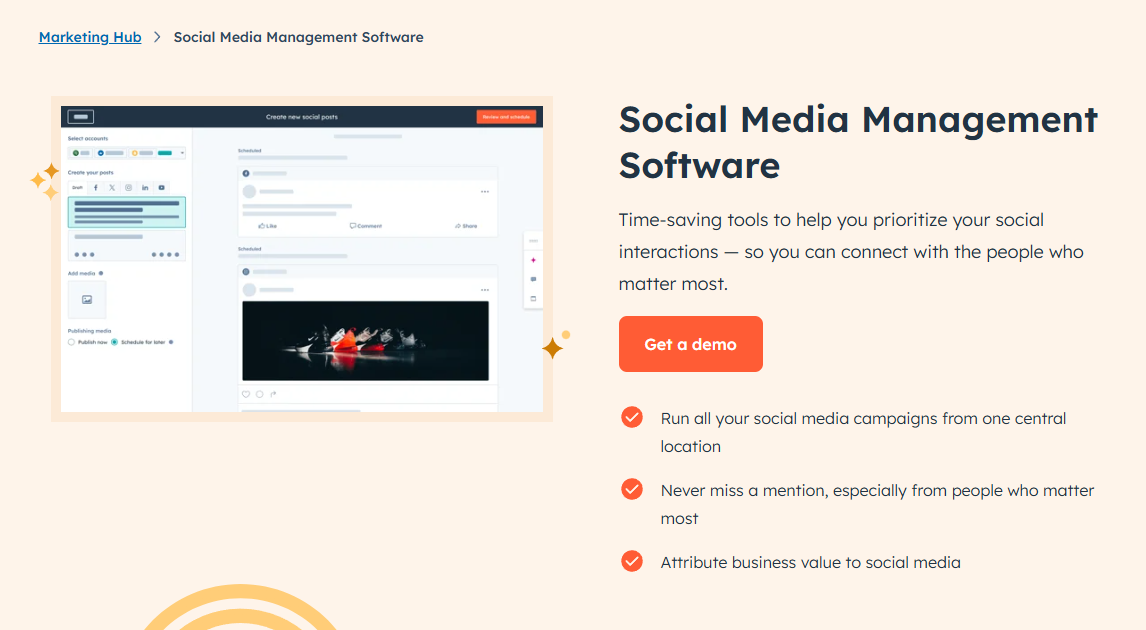
Manage social accounts, schedule posts, and monitor activity without leaving HubSpot.
Use Case Example
Link your Facebook, Instagram, LinkedIn, and X (Twitter) accounts.
When you publish a new blog post, HubSpot can automatically share it across your channels.
You can schedule content for weeks in advance and, most importantly, track which social posts are actually driving traffic and leads back to your site.
Pro Tip: Use the social monitoring tool to listen for mentions of your brand or key industry terms. This allows you to jump into relevant conversations and engage with potential customers proactively.
SEO & Content Strategy
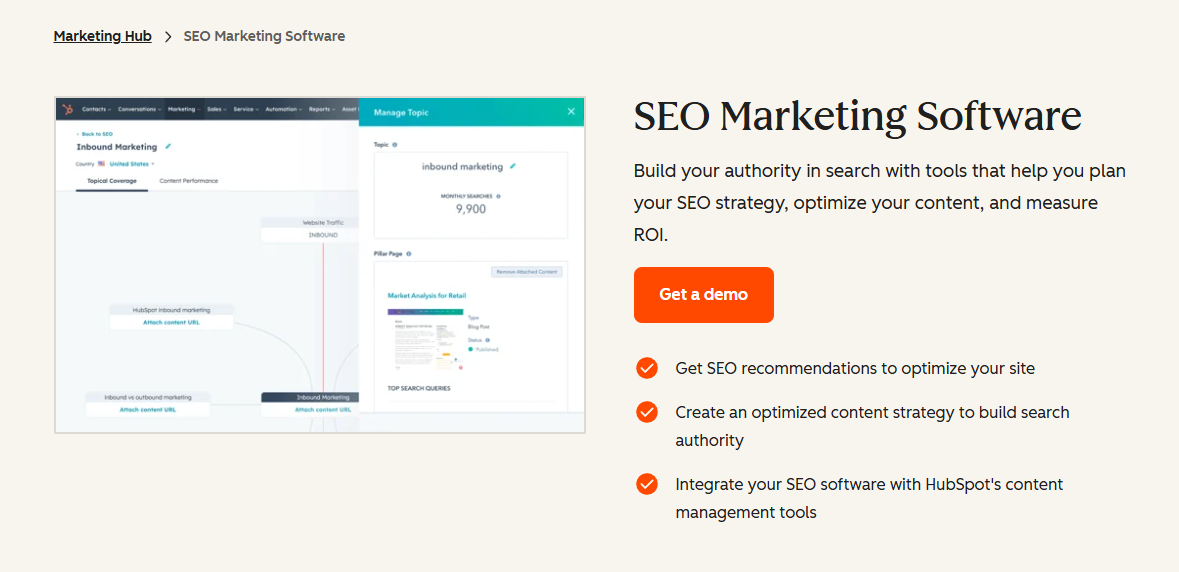
Marketing Hub offers recommendations and tools to improve your search engine rankings.
Use Case Example
As you write a blog post inside HubSpot, the SEO tool will give you real-time suggestions for keywords, structure, and internal linking.
The topic cluster tool helps you plan your content strategy by visualizing how your main “pillar” pages connect to smaller, related blog posts, positioning you as an authority in your niche to Google.
Pro Tip: In addition to HubSpot, I would highly recommend using Rank Math SEO if you’re using a WordPress website, along with Semrush, which is much more advanced in terms of SEO as a dedicated tool.
Lead Management & Segmentation

This is where HubSpot transitions from a good tool to an indispensable one.
It’s not just about tracking activity; it’s about building a complete, chronological story for every single contact.
Imagine knowing that a lead first found you six months ago via a blog post, then downloaded an eBook last month, visited your pricing page three times this week, and just opened your latest marketing email.
HubSpot doesn’t just give you data; it gives you intelligence.
Use Case Example
You can see every page a lead has visited, every email they’ve opened, and every form they’ve submitted.
With this data, you can create hyper-targeted “Active Lists.”
For example, create a list of all contacts who have visited the pricing page more than twice but haven’t spoken to sales.
This is a hot list you can hand directly to your sales team.
Reporting And Analytics

Assess campaign effectiveness with customizable dashboards.
Use Case Example
Create a dashboard that shows your most important marketing KPIs side-by-side: website traffic sources, new leads per day, landing page conversion rates, and email open rates.
The real power comes from attribution reporting (Pro+), which can show you exactly which marketing campaigns, channels, or even individual blog posts generated the most customers.
HubSpot Sales Hub: Your Sales Supercharger
If Marketing Hub attracts the audience, Sales Hub turns that audience into revenue.
This suite of tools is designed to give your sales team superpowers, helping them save time, get deeper insights, and close more deals, faster.
It’s a powerful alternative to platforms like Pipedrive or the more complex Salesforce.
Core Features within HubSpot Sales Hub
Deal Pipelines

This is the visual heart of your sales process.
Use Case Example
Create a customized, drag-and-drop pipeline that mirrors your exact sales process (e.g., Lead In > Appointment Scheduled > Demo Completed > Proposal Sent > Closed Won).
Sales reps can easily move deals from one stage to the next, and managers get an instant, accurate forecast of the entire pipeline.
Pro Tip: Automate your pipeline. Create rules that automatically create a task for a rep to follow up three days after a deal moves into the “Proposal Sent” stage, ensuring no opportunity goes cold.
Sales Automation (Sequences)

Automate your sales outreach without losing the personal touch.
Use Case Example
Instead of manually sending follow-up emails, a rep can enroll a prospect in a “Sequence.”
This could be a series of 5 personalized email templates and 2 task reminders (e.g., “Call Prospect”) spread over two weeks.
If the prospect replies or books a meeting at any point, HubSpot automatically unenrolls them from the sequence. This is a game-changer for sales productivity.
Best Practice: Sequences are powerful, but they can be misused as a spam tool. The key is to use highly personalized templates that feel one-to-one, not like a generic blast.
Meeting Scheduler
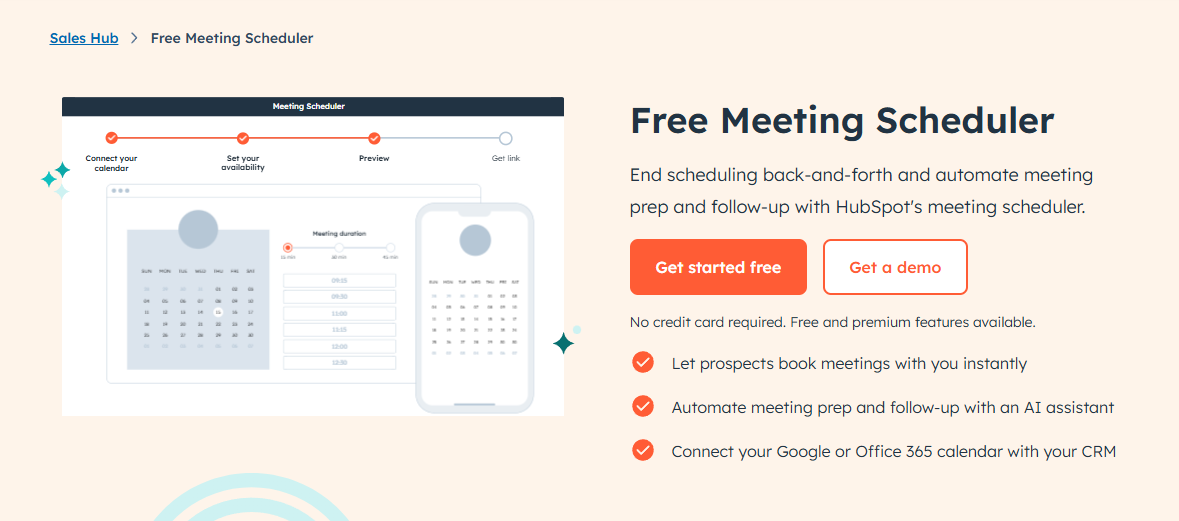
Eliminate the endless back-and-forth of scheduling calls.
Use Case Example
Each sales rep gets a personal booking link they can share in their email signature.
The prospect sees the rep’s real-time availability (synced with their Google or Outlook calendar) and can book a meeting with one click. This simple tool saves hours every week.
Pro Tip: Create different meeting links for different purposes, like a 15-minute discovery call and a 45-minute demo, to better control your calendar.
Sales Playbooks (Professional+)

Give your team a script for success.
Use Case Example
Create interactive guides for your sales reps directly within the HubSpot CRM.
For example, you can build a “Discovery Call Playbook” with key questions to ask, competitive battle cards, and objection-handling scripts.
Reps can access this during a live call, ensuring consistency and quality across the team.
CPQ (Configure, Price, Quote) Tools

Create professional, trackable sales quotes.
Use Case Example
Generate a quote from a deal record, pulling from a pre-set product library.
You can add discounts, optional line items, and even collect payment directly via HubSpot Payments or Stripe integration.
You get notified the moment a prospect opens the quote, allowing for perfectly timed follow-up.
Call Tracking & Recording

Log every call and gain coaching insights.
Use Case Example
Reps can make calls directly from their browser through HubSpot.
The platform can automatically log, record (with consent), and even transcribe the call, attaching it to the contact’s record.
Sales managers can later review these calls to provide targeted coaching on what went well and where to improve.
HubSpot Service Hub: From Support Tickets to Customer Delight
In the flywheel model, customer service isn’t a cost center; it’s a growth engine.
Happy customers buy more and refer their friends.
Service Hub provides the tools to deliver exceptional support and turn customers into vocal promoters.
It competes directly with platforms like Freshdesk and Keap, but with the unique advantage of being natively connected to the HubSpot CRM.
Core Features within HubSpot Service Hub
Now, let’s have a look at the core features that you get with the HubSpot Services Hub to grow your business.
Ticketing System
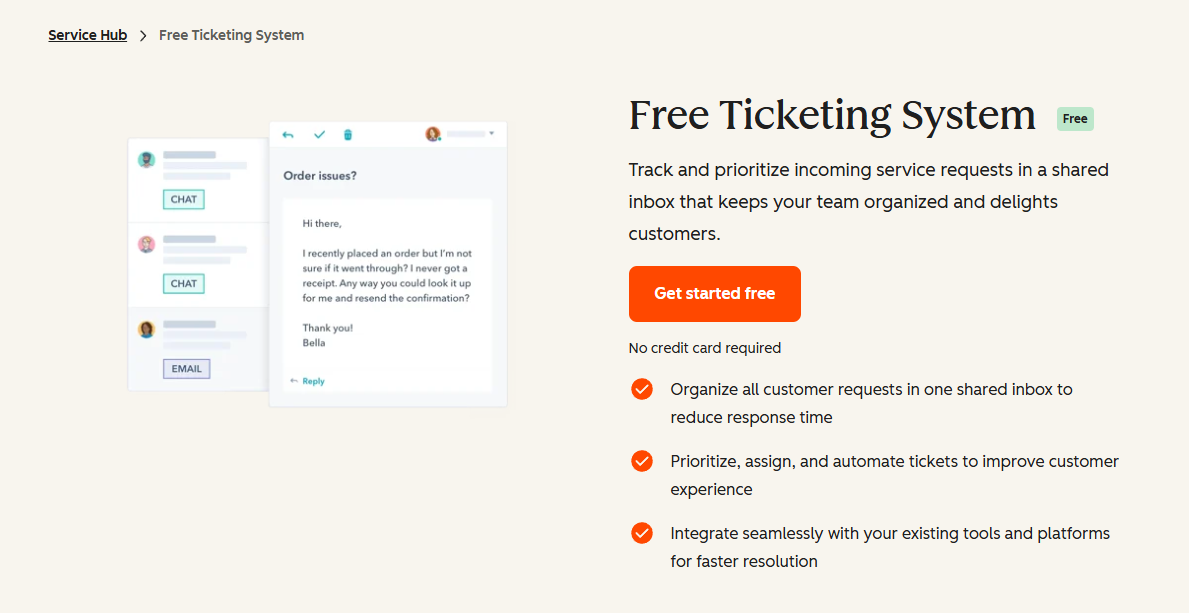
Organize, prioritize, and track all customer issues in one place.
Use Case Example
When a customer emails your support address, HubSpot automatically creates a ticket and assigns it to a support rep.
The entire conversation is tracked, and you can build automation rules, such as “If a ticket is marked ‘Urgent’ and hasn’t been responded to in 1 hour, notify the support manager.”
This ensures nothing falls through the cracks.
Knowledge Base
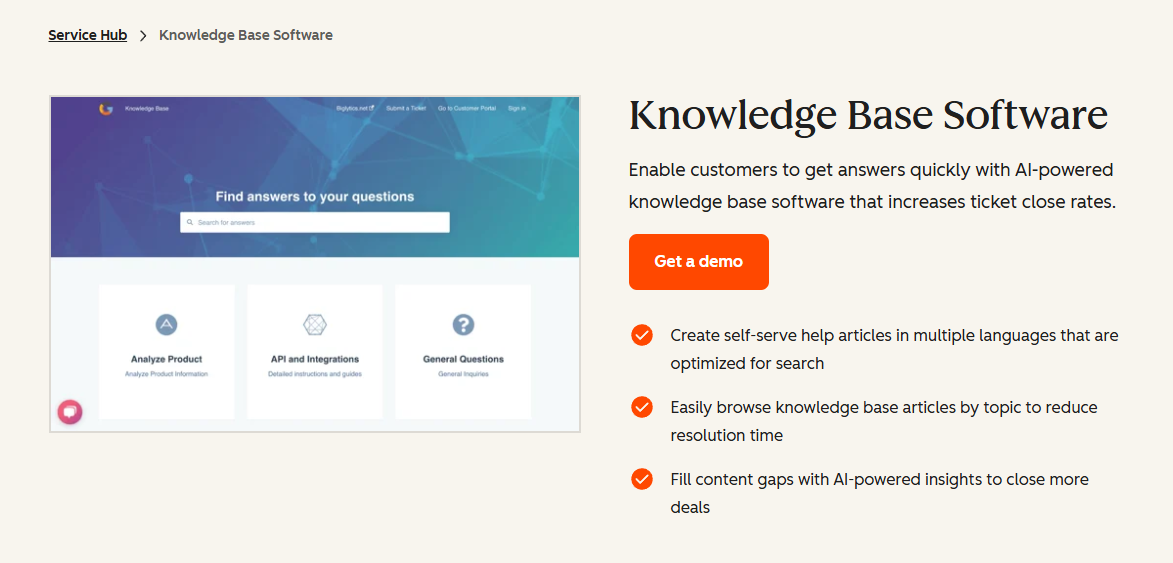
Empower customers to help themselves, 24×7.
Use Case Example
Create a library of helpful articles, guides, and FAQs.
When customers have a common question, they can find the answer themselves without needing to contact your team.
HubSpot even reports on which articles are most helpful and which search terms yield no results, showing you what content you need to create next.
Pro Tip: Integrate your knowledge base with your chatbot. The bot can automatically suggest relevant articles to customers before escalating the issue to a human agent, saving your team time.
Customer Feedback Surveys

Measure customer happiness and identify areas for improvement.
Use Case Example
Automatically send surveys after a support ticket is closed (CSAT – Customer Satisfaction), after a customer has been with you for 90 days (NPS – Net Promoter Score), or after a new onboarding is complete (CES – Customer Effort Score).
This data feeds directly back into the contact record, giving you a holistic view of customer health.

A universal inbox for your entire team.
Use Case Example
Funnel all incoming messages from email (support@), live chat, and even Facebook Messenger into one collaborative inbox.
Anyone on the team can see incoming queries, assign them to the right person, and respond without stepping on each other’s toes.
Customer Portal (Professional+)
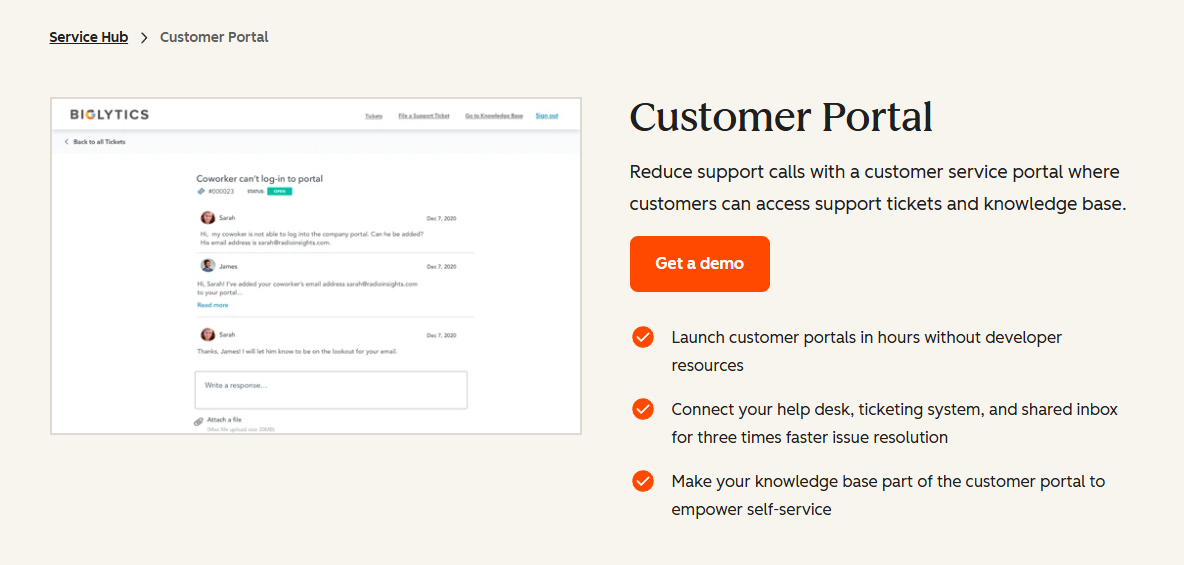
Give customers a secure place to manage their relationship with you.
Use Case Example
Customers can log in to a branded portal to view and manage their support tickets, check their subscription status, and access exclusive knowledge base content.
This improves transparency and gives customers a sense of control.
The Supporting Hubs (Content, Data, Commerce)

While Marketing, Sales, and Service are the big three, the other hubs provide the critical infrastructure that ties everything together and elevates HubSpot from a collection of tools to a true platform.
Content Hub (CMS Hub): More Than Just a Website.
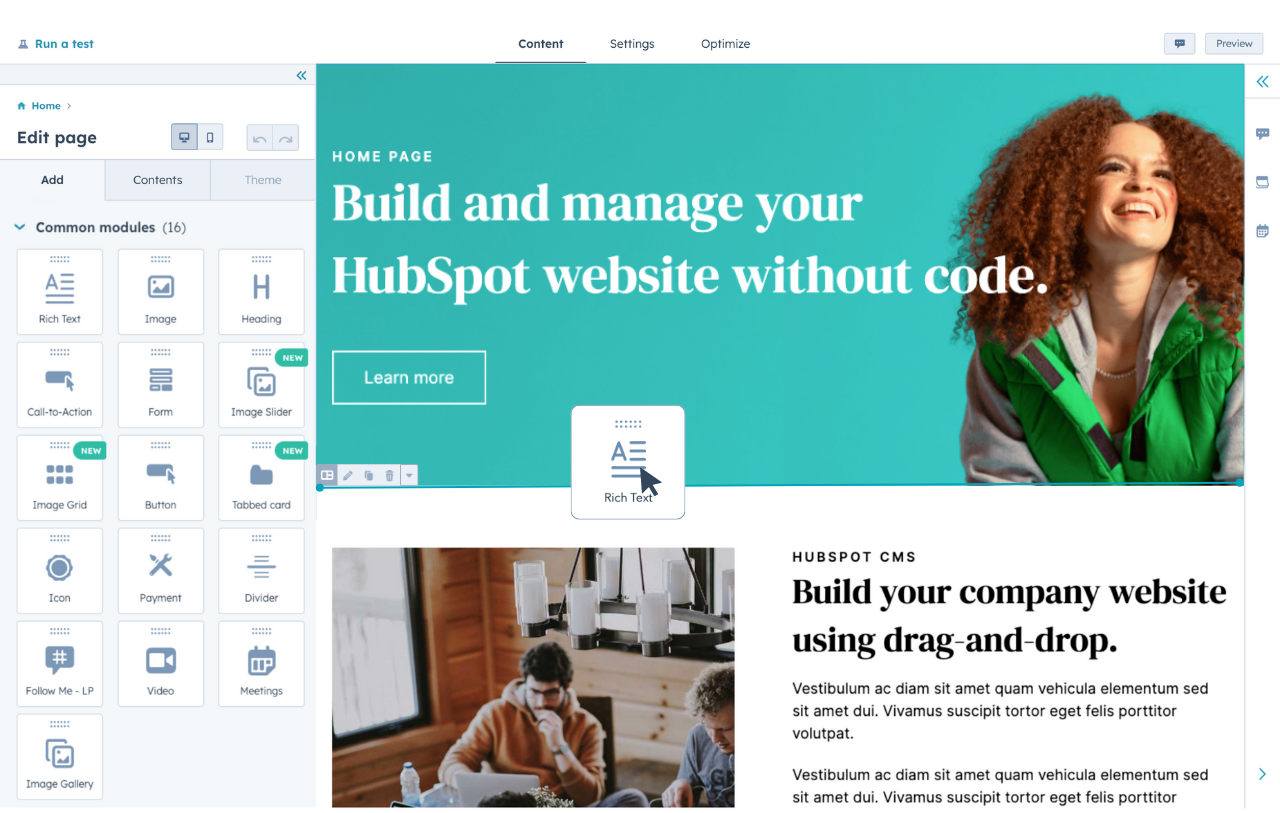
Your website is your digital storefront, and Content Hub is built to make it fast, secure, and intelligent.
While many businesses start with WordPress, Content Hub is designed for marketers and business owners who want power without the technical overhead.
Key Advantages
Smart Content & Personalization: This is where HubSpot blows platforms like WordPress out of the water. You can show a different headline to a first-time visitor versus a returning customer. You can change a call-to-action based on the visitor’s industry or location (which you know from their HubSpot CRM record). This level of personalization dramatically increases conversion rates.
World-Class Security & Performance: You don’t have to worry about security! HubSpot handles it all for you. Every site on the Content Hub comes with a global CDN (Content Delivery Network) for fast load times, a standard SSL certificate, and a Web Application Firewall (WAF). You never have to worry about a “critical WordPress plugin update” breaking your site again.
Data Hub: The Engine Room of Your Business.
As your business scales, so does your data complexity.
Data Hub is the secret weapon for RevOps professionals and anyone tired of dealing with messy data and disconnected apps.
It’s the glue that holds your entire tech stack together.
Key Advantages
Data Sync: Unlike basic one-way pushes (like Zapier), HubSpot’s Data Sync creates a real-time, bidirectional connection between HubSpot and other apps like Salesforce, Microsoft Dynamics, or your ERP. When a contact’s phone number is updated in one system, it’s instantly updated in the other. This eliminates manual data entry and ensures data consistency everywhere.
Data Quality Automation: Set up workflows to automatically format property values. For example, you can ensure all “State” properties are capitalized, all phone numbers follow a consistent format, and first names are never in all caps. This keeps your database clean and professional without any manual effort.
Commerce Hub: Streamlining Your Revenue.
Getting paid should be the easiest part of your job.
Commerce Hub integrates payment processing directly into the HubSpot CRM, making it seamless for consultants, agencies, SaaS companies, and anyone else selling products or services.
Key Advantages
Unified Data: When you use Commerce Hub, your revenue data isn’t stuck in a separate system like Stripe or PayPal. It lives right on the contact and deal records in your CRM. This allows you to build reports that show the lifetime value of customers from different marketing sources or identify your most profitable services.
The Power of AI in HubSpot: Your New Strategic Partner

HubSpot has gone all-in on Artificial Intelligence, weaving “smart automation” and AI assistance across the entire platform.
These aren’t gimmicks; they are powerful tools designed to make you smarter, faster, and more effective.
AI Content & Email Writer
Facing writer’s block? Simply type / in a marketing email or highlight existing text, and the AI Content Assistant will help you brainstorm ideas, write paragraphs, rephrase content, or even change the tone to be more professional or entertaining.
AI Chatbots & Assistants (Breeze)
HubSpot’s new AI assistant, Breeze, is a major upgrade.
Breeze Copilot
This is like having a strategic teammate built into your portal.
You can ask complex questions in plain language, like “Show me all my deals in the proposal stage that haven’t been touched in a week,” and it will pull the report for you.
It’s available even for free users.
Breeze Customer Agent
This AI-powered chatbot can handle customer service queries, understand intent, and provide answers by drawing from your knowledge base, all while maintaining a natural, conversational tone.
Predictive Lead Scoring (Enterprise)
This AI model analyzes thousands of data points from your past won and lost deals to identify the common attributes of your best customers.
It then scores your new incoming leads to predict which ones are most likely to close, helping your sales team prioritize their efforts.
HubSpot Deep Research Connector with ChatGPT
HubSpot is the first CRM with a direct, deep research connector to ChatGPT.
You can ask complex, multi-variable questions about your HubSpot data.
For example, “Analyze my closed-won deals from last quarter and identify the top three common attributes of the customers who bought the fastest.”
This provides strategic insights that were previously impossible to get without a dedicated data analyst.
Integrations & Support: The Full Ecosystem

A platform is only as good as its ability to connect with other tools and the support you receive when you need it. This is an area where HubSpot truly excels.
The HubSpot App Marketplace
HubSpot boasts a vast App Marketplace with over 1,500 applications, making it easy to connect with tools you already love, like Slack, Zoom, FreshBooks, Shopify, and Google Workspace.
The quality of these integrations varies, but the top-tier ones offer deep, two-way sync.
World-Class Support and Community: This is a major, often overlooked, advantage.
HubSpot Academy: A free online training resource with hundreds of hours of video courses and certifications on everything from inbound marketing to specific HubSpot tools. It’s a goldmine for training your team.
Knowledge Base & Community: An extensive library of how-to articles and a vibrant community forum where you can get answers from other users and HubSpot experts.
Direct Support: Depending on your plan, you get access to email, chat, and phone support with some of the most helpful and knowledgeable support reps in the industry.
HubSpot Pricing in 2026: A Quick Look
Note
The prices vary depending on what you choose and where you live, or the currency you’ll choose, and they may change very often, so it’s always best to check the price directly. Click here to do so!
Understanding HubSpot’s pricing is crucial, as it can get complex and varies a lot.
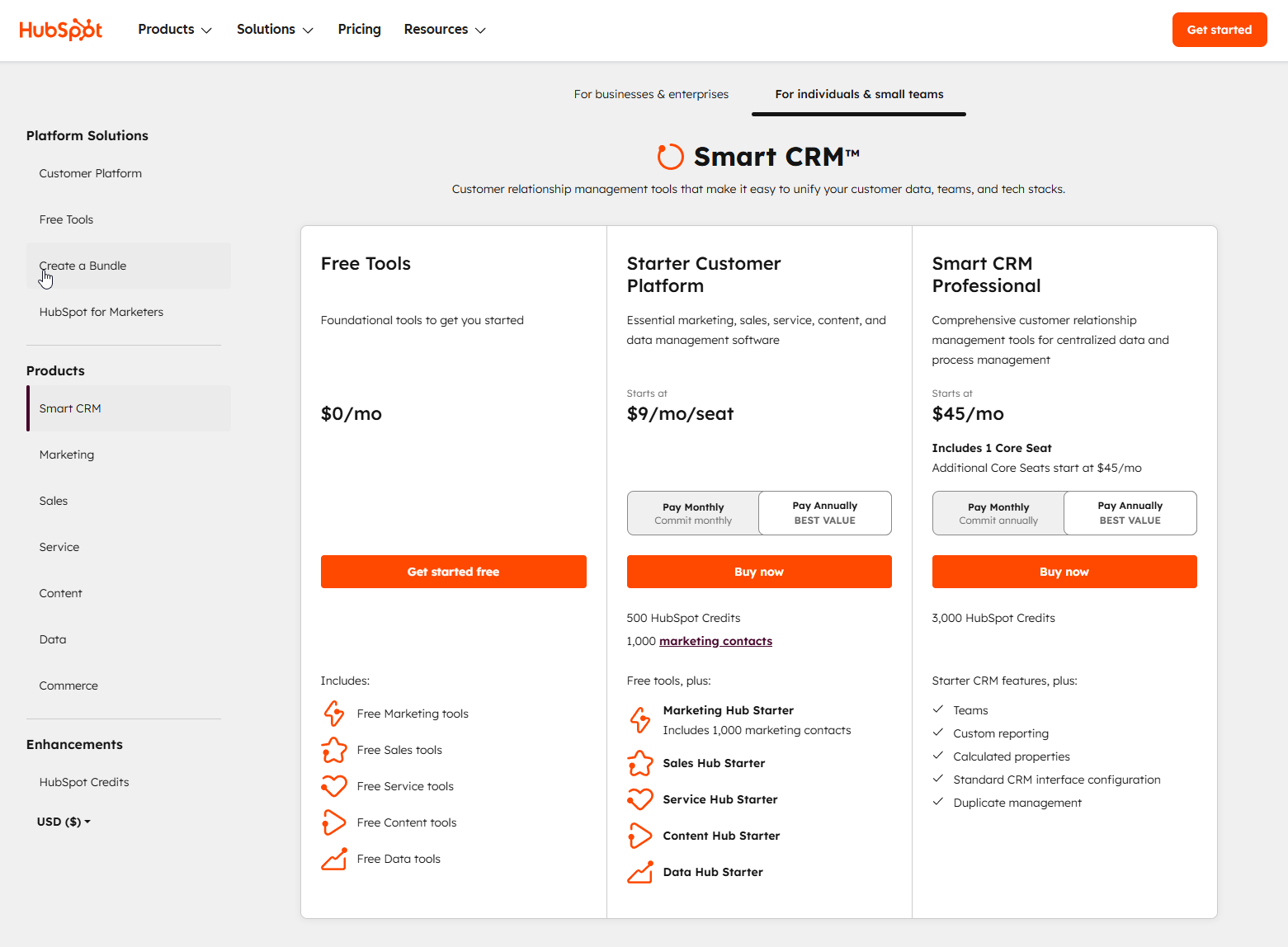
Your subscription depends on the Hubs you choose, the Tier (Starter, Professional, Enterprise), the number of “Core Seats,” and, for Marketing Hub, the number of your marketing contacts.
In addition to that, the prices may also vary depending on where you’re located or the choice of your currency.
Because of all these variables, I would highly recommend that you check the price directly by clicking here, but I’ll still talk about the general pricing structure and plans as of writing this to give you some idea.
And here’s a basic table for the HubSpot Smart CRM package that will give you some idea before I talk about the plans a little bit:
| Plan’s Name | Regular Price |
|---|---|
| Free Tools | $0/m |
| Starter Customer Platform | $9/m |
| Smart CRM Professional | $45/m |
| Smart CRM Enterprise | $75/m |
Now, let’s talk about those plans a little bit in detail.
The Free Plan
The free plan is incredibly generous.
You get the HubSpot CRM with some limitations, but not so restrictive that you can’t use it at all, like many other platforms. You get the basic tools from all the Hubs.
This is the perfect, risk-free starting point.
The Starter Tier
Starts around $9/month per seat. This tier removes HubSpot branding and unlocks more features and higher limits.
It’s ideal for small businesses and solopreneurs.
While I like HubSpot a lot but I do think that this is the only plan that makes sense for individuals, and the rest are fully focused on SMBs and Enterprises.
The Professional Tier
This is a significant jump, and it’s often the biggest point of hesitation for growing businesses.
Why the steep increase?
This is the tier where HubSpot stops being a collection of tools and becomes a true automation platform.
You’re not just paying for more features; you’re paying for the ability to build complex, cross-channel ‘if-this-then-that’ logic that can run your business on autopilot.
The mandatory onboarding is designed to ensure you actually set this up for success.
Also, the exact price for this one will vary, but generally it should be somewhere around $1300 to begin with.
The Enterprise Tier
The highest tier, for large, scaling companies.
The CRM Suite Enterprise generally starts at $75/month per seat.
This provides the most extensive functionality.
As expected, the onboarding fee here is on the higher side.
Decoding the Costs: Beyond the Sticker Price
It’s important to understand the two main variables that increase your cost:
- Marketing Contacts: The Marketing Hub price is tied to the number of contacts you actively market to. The base price includes a certain number (e.g., 2,000 for Pro), and the price increases as you add more contacts in tiers.
- Seats: Your plan comes with a certain number of “Core Seats” (users who can edit and use the full tools). You can add more seats for an additional monthly fee.
Pay attention to these as well, as they will quickly boost the overall pricing for the HubSpot Suite of your choice, and you may end up paying more than you initially thought of.
The Final Verdict: Who Is HubSpot Really For?
After this exhaustive review, the question remains: is HubSpot the right partner for your growth?
PROS: Why HubSpot Shines?
CONS: Considerations Before Committing
Frequently Asked Questions
Now let’s quickly have a look at some frequently asked questions that you might also have in your mind.
Is HubSpot’s CRM Suitable For Small Businesses?
Yes, HubSpot is ideal for small businesses. The free CRM provides essential functionality for startups, while paid tiers scale affordably as you grow. According to industry research on marketing automation platforms, small businesses typically see strong returns on CRM investments, with most achieving positive ROI within 3-6 months through improved lead conversion and sales efficiency.
Can Solopreneurs And Freelancers Use HubSpot Effectively?
HubSpot is perfect for solopreneurs because the free plan and Starter tier provide everything needed to run a complete business. You get CRM software, email marketing, meeting scheduling, and invoicing for a very low cost. Many freelancers manage their entire customer journey through HubSpot’s integrated platform.
Is HubSpot Worth It For Mid-market Companies (50-500 Employees)?
HubSpot excels for mid-market businesses. Companies this size often suffer from disconnected tools and data silos. HubSpot solves this by unifying marketing automation, sales processes, and customer service in one platform. The Professional and Enterprise tiers provide advanced features that help mid-market companies compete with larger players.
Should Enterprise Companies Consider HubSpot Over Salesforce?
HubSpot Enterprise offers key advantages: It provides a more user-friendly alternative to complex platforms like Salesforce. HubSpot delivers faster implementation, better user adoption, and integrated marketing automation.
Can HubSpot Integrate With My Existing Tools?
HubSpot offers 1,900+ integrations covering most business applications. Popular integrations include Google Workspace, Microsoft Office, Slack, Shopify, and QuickBooks. Custom integrations are possible through HubSpot’s robust API. Top-tier integrations offer deep, two-way data synchronization.
Is HubSpot’s Pricing Competitive?
HubSpot offers excellent value for integrated platforms. While individual tools might cost less separately, the total cost of achieving HubSpot’s functionality through multiple vendors typically exceeds HubSpot’s pricing. The ROI comes from improved efficiency, better data insights, and eliminated tool switching costs.
Final Thoughts: The Conclusion
From my perspective, and after years of real-world use, HubSpot is a solid, powerful, and transformative tool for running a modern business.
It empowers businesses to build lasting relationships, not just process transactions.
If you are serious about growth in 2026 and beyond, there is no better platform to have as your foundation.
Ready to transform your business operations and fuel your growth?
Get started with HubSpot for Free and discover the power of an all-in-one customer platform today!
![HubSpot CRM Review [year]: Is It Worth The Investment For Growing Businesses? 1](data:image/svg+xml;base64,PHN2ZyB4bWxucz0iaHR0cDovL3d3dy53My5vcmcvMjAwMC9zdmciIHdpZHRoPSIzMDAiIGhlaWdodD0iMzYiPjxnIGZpbHRlcj0iYmx1cigxMnB4KSI+PHJlY3Qgd2lkdGg9IjIwMCUiIGhlaWdodD0iMjAwJSIgeD0iLTUwJSIgeT0iLTUwJSIgZmlsbD0iIzVjOGNhNCIvPjxyZWN0IHdpZHRoPSIxMDAlIiBoZWlnaHQ9IjEwMCUiIGZpbGw9IiM1YzhjYTQiLz48ZyB0cmFuc2Zvcm09InRyYW5zbGF0ZSguNiAuNilzY2FsZSgxLjE3MTg4KSI+PGNpcmNsZSBjeD0iMTM0IiBjeT0iMTkiIHI9IjIxNSIgZmlsbD0iI2Y2ZThkZiIgZmlsbC1vcGFjaXR5PSIuOSIvPjxlbGxpcHNlIGN4PSIyMTkiIGN5PSI3IiBmaWxsPSIjMjkzYjRiIiBmaWxsLW9wYWNpdHk9Ii43IiByeD0iMzQiIHJ5PSIyIi8+PHBhdGggZmlsbD0iI2ZmMjEwMCIgZmlsbC1vcGFjaXR5PSIuNSIgZD0iTTEzNyAxMWgzM3Y4aC0zM3oiLz48cGF0aCBmaWxsPSIjNmM3YjgxIiBmaWxsLW9wYWNpdHk9Ii40IiBkPSJNMzkgMTBoODF2MTBIMzl6Ii8+PC9nPjwvZz48L3N2Zz4=)
![HubSpot CRM Review [year]: Is It Worth The Investment For Growing Businesses? 2](data:image/gif;base64,R0lGODdhAQABAPAAAMPDwwAAACwAAAAAAQABAAACAkQBADs=)