Disclosure: This website uses affiliate links; I may earn commissions at no extra cost to you. Learn more.
Choosing your marketing and sales software is a massive decision. With this ultimate HubSpot VS GetResponse comparison, I would like to make it easier for you to decide which one is the right fit for you.
I’ve been in that exact spot. I’ve spent countless hours building email campaigns, managing contacts, and tracking ROI in both platforms.
It’s a classic battle: the all-in-one CRM powerhouse versus the specialized email marketing and funnel builder.
In this post, I’m breaking down exactly where HubSpot shines and where GetResponse’s funnel builder gives it an edge. My goal is to help you find the right one for your business.
HubSpot vs GetResponse: The Quick Answer (Who is Each Best For?)
Here’s the direct answer: HubSpot is the best all-in-one platform for businesses of any size that want a powerful, free CRM to build their entire sales, marketing, and service system upon.
GetResponse is the better choice for online marketers, course creators, and e-commerce businesses focused specifically on building high-converting email marketing funnels and automated email campaigns.
While GetResponse has added more features, its heart is in email automation features. HubSpot’s heart is its CRM, which acts as the central brain for your entire business.
HubSpot vs GetResponse: Side-by-Side Comparison
Here’s a high-level look at how these two platforms stack up. Remember, HubSpot is listed first, as it’s our baseline for a complete business platform.
| Feature | HubSpot | GetResponse |
|---|---|---|
| Core Strength | All-in-One CRM Platform (Sales, Marketing, Service) | Email Marketing & Conversion Funnels |
| Free Plan | Yes (Best-in-class Free Tools) | Yes (Free-forever plan with basic features) |
| Free Plan Limit | Generous free tools, 1,000 contacts | Up to 500 contact list, 2,500 emails/mo |
| CRM | Full-featured, pipeline management, deal tracking | Basic pipeline visualization (not a true CRM) |
| Email Marketing | Powerful, integrated with CRM & automation | Excellent, feature-rich, high deliverability |
| Marketing Automation | Extremely advanced, visual workflows | Very strong, visual, funnel-focused |
| Landing Pages | Yes, drag-and-drop, tied to CRM | Yes, drag-and-drop, optimized for funnels |
| Forms | Advanced, pop-ups, integrated | Yes, integrated with landing pages |
| Chatbot Builder | Yes (Free), powerful, and code-free | Yes, but more basic |
| Sales Tools | Extensive, meeting scheduling, quotes, sequences | Basic |
| Service Tools | Yes (Service Hub), ticketing, help desk, feedback | No |
| Best For | B2B, B2C, Service, and Sales-focused businesses | E-commerce, Creators, Bloggers, Marketers |
| Pricing | Scales from free to enterprise (can get expensive) | Predictable, feature-based tiers |
What is HubSpot? (And Why It’s More Than a CRM)
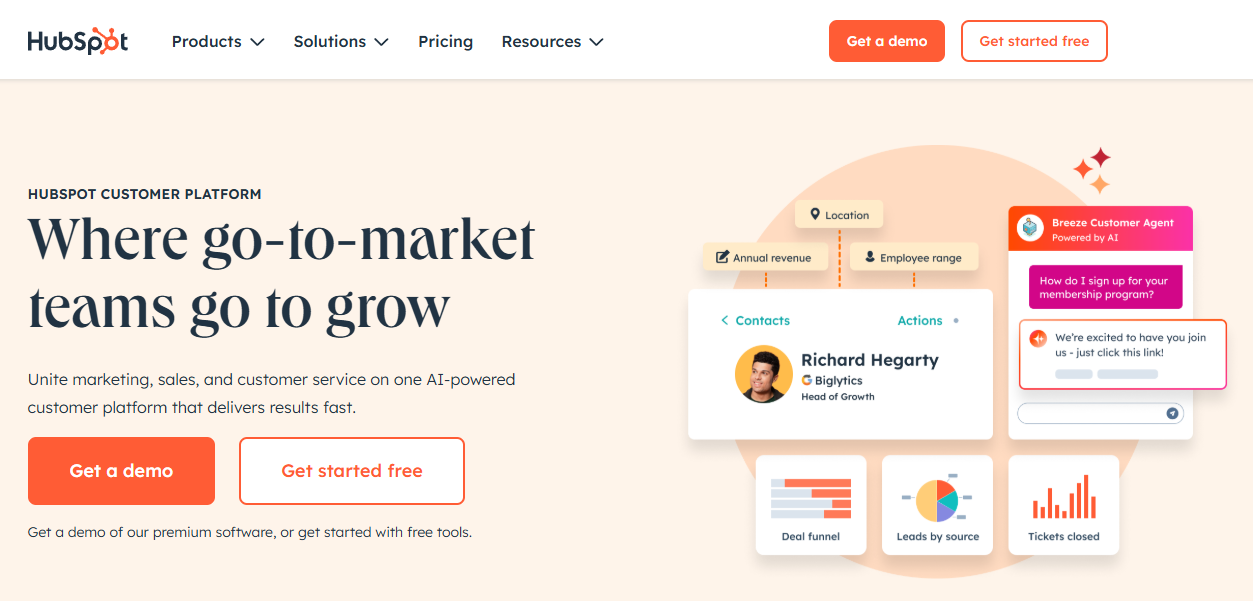
I used to think of HubSpot as just another expensive marketing tool. I was wrong.
The game-changer is the HubSpot CRM. It’s 100% free, and it’s not a “lite” version. It’s a genuinely powerful tool for managing all your customer relationships, tracking deals, and seeing your entire sales pipeline.
Everything else in the HubSpot software ecosystem builds on top of this free CRM. This is what sets it apart.
You start with the free CRM and then add the “Hubs” you need as you grow:
- Marketing Hub: For email marketing, automation, landing pages, and social media.
- Sales Hub: For advanced deal tracking, sales sequences, and meeting scheduling.
- Service Hub: For customer support, ticketing, and knowledge bases.
- Content Hub: For building your entire website on HubSpot.
- Data Hub: For syncing data and automating business processes.
HubSpot CRM (The Free Core)
This is where every business should start. Even if you choose another tool for email, you can (and maybe should) still use the free HubSpot CRM.
It gives you:
- Contact Management: A full, detailed record of every interaction with a contact.
- Lead Management: Track leads from first touch to final sale.
- Pipeline Management: A visual, drag-and-drop board to see where every deal stands.
- Chatbot Builder: A free, code-free bot to capture leads on your site 24/7 or for lead generation.
- Forms: Free forms to capture leads and automatically feed them into your CRM.
HubSpot Marketing Hub (The Growth Engine)
This is the direct competitor to GetResponse. The HubSpot Marketing Hub connects all your marketing efforts directly to your CRM data.
When I was testing it, the best part was seeing a contact’s entire journey. I could see they opened an email, visited a landing page, chatted with our bot, and then were assigned to a salesperson. That unified view is incredibly powerful. It includes everything from email marketing and landing pages to social inbox management.
HubSpot Service Hub (The Support System)
This is something GetResponse just doesn’t offer. The Service Hub is for customer success management.
If you run a business that needs a help desk or ticketing system, HubSpot provides it. You can manage customer support tickets, build a knowledge base, and send customer feedback surveys, all from the same platform.
What is GetResponse? (The Email & Funnel Specialist)
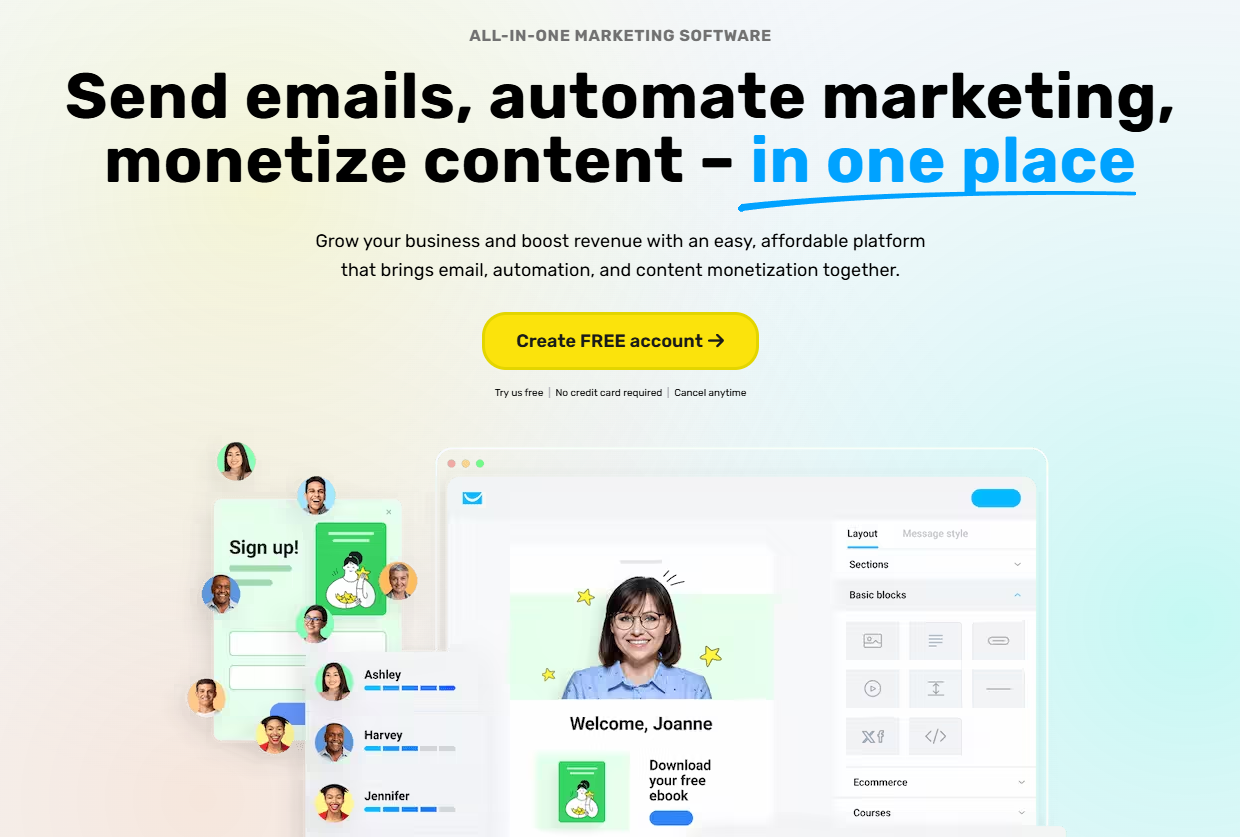
GetResponse has been a leader in the email marketing space for years. I’ve used it for several clients who are bloggers, course creators, and e-commerce stores.
Its main strength is making complex marketing automation simple.
While HubSpot is an all-in-one platform, GetResponse is an “all-in-one marketing” platform. It’s less concerned with your sales team’s pipeline and more focused on getting a new subscriber to make that first purchase.
GetResponse Email Marketing & Automation
This is GetResponse’s bread and butter. It’s fantastic.
The automation builder is visual and easy to use. You can drag and drop conditions and actions to build sophisticated welcome sequences, cart abandonment campaigns, and more. I’ve always been impressed with its deliverability, too.
GetResponse Conversion Funnels
This is their killer feature. GetResponse was one of the first to offer a pre-built, visual “funnel builder” for specific goals (like a webinar or a product sale).
You can click a button to build all the necessary assets at once:
- A sign-up page
- An exit-intent pop-up
- An email nurture sequence
- A sales page
- A checkout page
They’ve even expanded this with an AI campaign generator, which can create a landing page, welcome email, and newsletter for you in minutes. For a solo marketer who needs to launch something fast, this is a massive time-saver. HubSpot lets you build all these things, but you have to assemble the “funnel” yourself.
GetResponse Website Builder
GetResponse now includes an AI-driven website builder. It’s decent for simple portfolio sites or landing pages, but it’s not a replacement for a full-featured CMS like WordPress or the HubSpot Content Hub.
HubSpot vs GetResponse: A Detailed Feature Showdown
Let’s get into the nitty-gritty.
1. CRM & Lead Management
This isn’t a fair fight.
HubSpot provides a world-class, free AI CRM. You can manage contacts, companies, deals, and tasks. You can log calls, send tracked emails from Gmail or Outlook, and get notifications when a lead opens your proposal. It’s built for sales and marketing.
GetResponse’s “CRM” (available on higher plans) is really just a simple pipeline visualization tool. It’s an add-on to its contact list. It doesn’t have the depth, customization, or sales-focused features of HubSpot.
Winner: HubSpot, by a landslide.
2. Email Marketing & Automation
This is a much closer battle.
GetResponse is built for this. Its templates are modern, and its automation builder is intuitive and powerful. For marketers who think in funnels, GetResponse feels natural.
The HubSpot Marketing Hub is also incredibly powerful. Its visual workflow builder is, in my opinion, even more flexible than GetResponse’s. You can create automation based on any property in the CRM (like a support ticket status, a deal stage, or a specific page view).
Winner: Tie. GetResponse might be slightly easier for pure email marketers. HubSpot is more powerful for businesses, automating the entire customer journey.
3. Landing Pages & Forms
Both platforms have excellent, drag-and-drop landing page builders.
GetResponse’s email templates are heavily optimized for direct-response marketing (webinars, sales, freebie downloads). They are quick to deploy.
HubSpot’s builder is also great, with the added benefit of “smart content.” This means you can show different content on the same landing page based on who is visiting (e.g., a new visitor vs. an existing customer). All form data flows instantly into the HubSpot CRM, which is a huge plus.
Winner: HubSpot, for its “smart content” and seamless CRM integration.
4. Pricing & Value
This is where things get complicated.
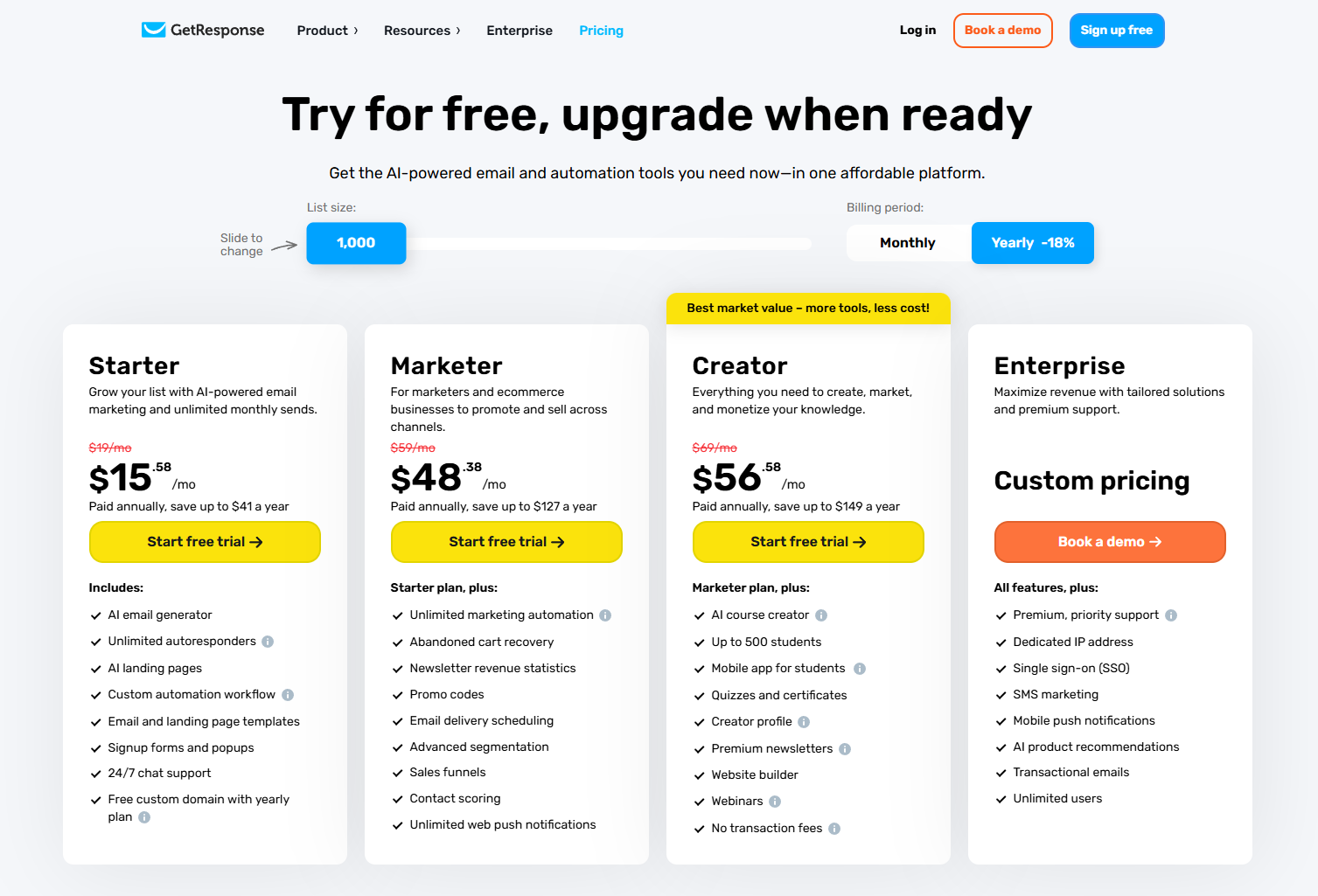
GetResponse has straightforward, predictable pricing. You pay based on your list size, and features unlock at different tiers. Its free plan is decent but limited to 500 contacts and 2,500 newsletters per month.
HubSpot has the best free tools in the world. You can use the Free CRM, Free Chatbot, Free Forms, and Free Email Marketing (with HubSpot branding) for up to 1,000 contacts.
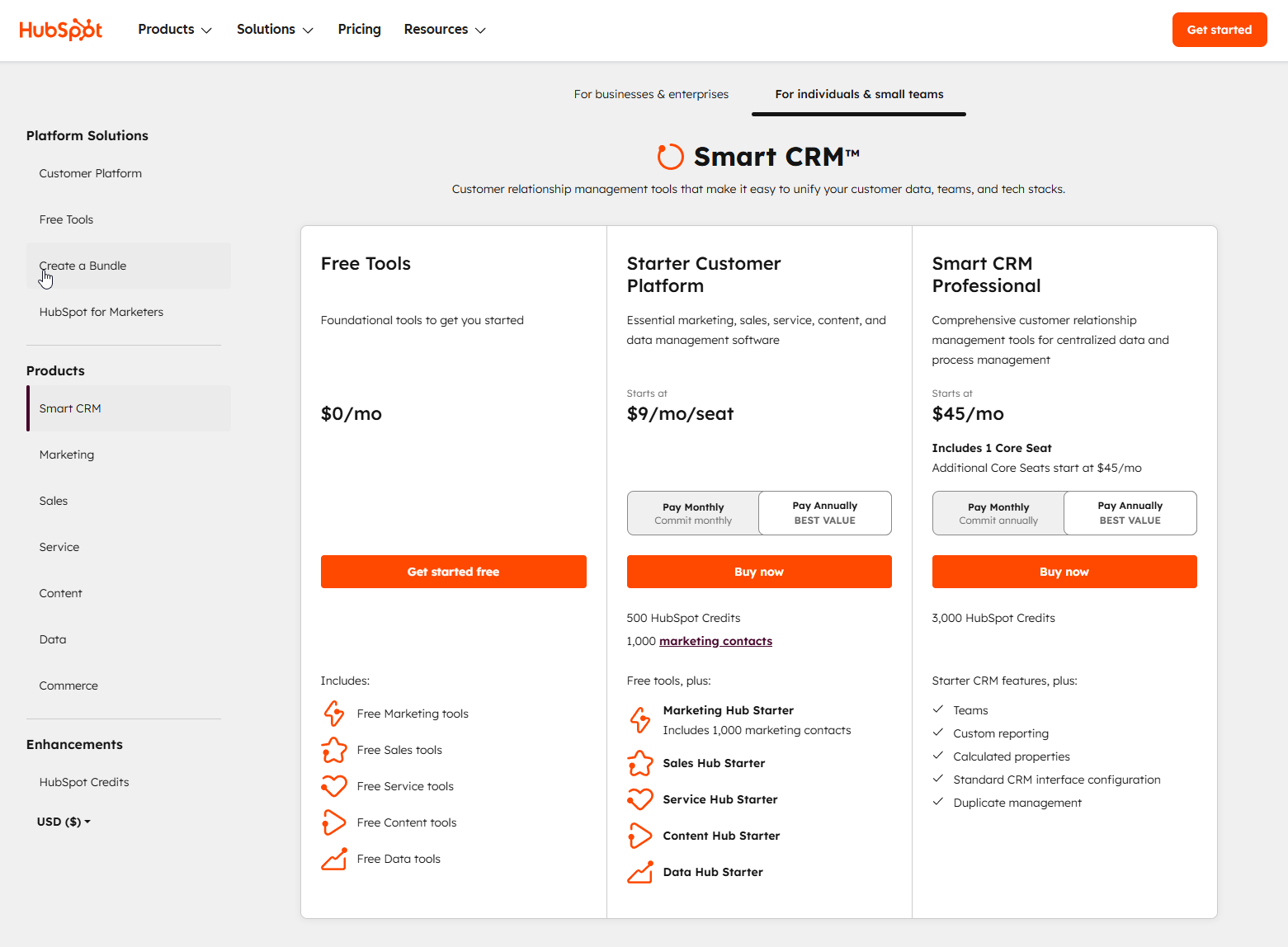
However, once you need the pro features in the HubSpot Marketing Hub, the price scales quickly. A common (and smart) strategy I’ve seen is to use the free HubSpot CRM and integrate it with a cheaper email tool.
But honestly, the power comes from keeping it all in one place.
Winner: HubSpot for the free plan’s power. GetResponse for predictable mid-tier pricing. HubSpot provides more long-term value because it scales with your entire business growth.
HubSpot Pros and Cons
| Pros | Cons |
|---|---|
| ✅ Unbeatable Free CRM & Tools | ❌ Can get very expensive at higher tiers |
| ✅ True all-in-one platform (Sales, Marketing, Service) | ❌ New ‘Core Seat’ pricing (2025) adds cost for each editing user |
| ✅ Seamless integration between all tools | ❌ Steep learning curve for advanced automation |
| ✅ Excellent chatbot builder and service software | ❌ Contracts are often annual, not monthly |
| ✅ Scales from a one-person startup to an enterprise | ❌ Less focused on e-commerce funnels than GetResponse |
GetResponse Pros and Cons
| Pros | Cons |
|---|---|
| ✅ Excellent for email marketing and funnels | ❌ CRM is very basic and not a standalone tool |
| ✅ “Conversion Funnel” feature is a huge time-saver | ❌ No native tools for sales teams (quotes, etc.) |
| ✅ Predictable, affordable pricing tiers | ❌ No customer service/support hub features |
| ✅ Great for creators, e-commerce, and info-products | ❌ Can feel “siloed” from other business areas |
HubSpot and GetResponse Alternatives
If neither of these feels quite right, you’re not out of options.
The main alternative I’ve worked with is Brevo (formerly Sendinblue). It’s a strong competitor that also combines a basic CRM with powerful email marketing, but often at a lower price point than HubSpot.
If you’re curious, I actually wrote a full comparison of HubSpot vs Brevo that you might find helpful. Other names you’ll hear are ActiveCampaign (known for automation) and Mailchimp (great for beginners).
Frequently Asked Questions (HubSpot vs GetResponse)
Q: What is HubSpot CRM best for?
HubSpot CRM is best for any business that needs a central, single source of truth for all customer interactions. It’s ideal for B2B companies managing a sales pipeline and B2C companies tracking the full customer lifecycle, from marketing lead to support ticket.
Q: How does HubSpot compare to GetResponse for a small business?
For a small business, HubSpot’s free plan is a more valuable starting point. It gives you a free, permanent home for your customer data (HubSpot CRM for up to 1,000 contacts) and more powerful free tools (chatbots, advanced forms). GetResponse’s free plan is more of a trial, limiting you to a 500-person contact list.
Q: Can I use HubSpot for email marketing?
Yes! The HubSpot Marketing Hub has a powerful email marketing tool that’s fully integrated with the CRM. You can send one-off newsletters or build complex automation sequences based on customer behavior.
Q: Is GetResponse a CRM?
No, not really. GetResponse has a feature it calls a CRM, but it’s a simple pipeline manager. It’s not a full-featured CRM software like HubSpot, Pipedrive, or Salesforce.
The Final Verdict: Why I Recommend HubSpot
After using both platforms extensively, my recommendation for most businesses is HubSpot.
Here’s why: GetResponse is an excellent tool, but HubSpot is a platform.
You can build an entire business on the HubSpot platform. The power of starting with the free HubSpot CRM and then adding on the Marketing Hub or Service Hub as you grow is unmatched. It builds a scalable foundation for your entire business, not just your email list.
GetResponse is a fantastic choice if—and only if—your only priority is building email funnels for digital products.
For everyone else, HubSpot is the smarter, more scalable, and more powerful long-term choice. You’re not just buying a tool; you’re investing in a central operating system for your business’s growth.
If you’re a marketer focused purely on funnels and email, and you’re sure you won’t need a deep sales CRM or service desk, then GetResponse is a solid, affordable choice.