Disclosure: This website uses affiliate links; I may earn commissions at no extra cost to you. Learn more.

It happens to every freelancer and small business owner eventually.
You hand your business card to a massive potential client, confidently type in your custom domain name to show them your portfolio, look at your homepage, and a wave of panic sets in.
You realize it looks like it was built half a decade ago.
The layout feels heavy. The typography is clunky. The mobile menu is broken. The entire aesthetic is disconnected from the premium quality of your work.
If you are feeling this friction, it is the perfect time to execute a spring site refresh and completely redesign your WordPress.com site.
Historically, executing a massive visual overhaul on a hosted website builder was an incredibly frustrating experience.
You were locked into a small, curated handful of pre-approved templates.
If you wanted to use a premium, highly specialized layout to stand out from your local competitors, you had to perform a complex content migration to an unmanaged hosting service.
This caused days of technical downtime. Databases broke. It created massive headaches.
That roadblock no longer exists.

Automattic recently changed the fundamental rules of their Content Management System.
They opened the gates.
Every single paid plan now includes full access to install any third-party WordPress Theme and over 50,000 WordPress plugins.
You get the absolute visual freedom of an open-source CMS platform without giving up the enterprise-grade security of managed hosting.
You no longer have to upgrade to a massive corporate tier just to change your layout.
I guide private clients through custom WordPress design overhauls constantly.
I see the exact same mistakes made every single time someone tries to update their digital presence.
Here is my exact, step-by-step, heavily tested strategy for executing a spring site refresh that actually improves your conversion rate, rather than just changing your brand colors.
Why a Spring Site Refresh Matters Right Now (And Costs You Money If Ignored)

An outdated website actively loses you high-paying clients.
Refreshing your design aligns your digital presence with your current premium pricing.
Your website is not a static digital brochure. It is a living marketing asset.
When you neglect it, your business suffers measurable financial damage.
Consumers are highly critical of visual design and web accessibility.
If a potential client lands on your portfolio and the first thing they see is a low-resolution banner image and a broken layout structure, they immediately assume your actual services are just as outdated and sloppy.
A redesign is about realigning your digital presence with your current business goals.
You might have pivoted from offering cheap hourly consulting to selling high-ticket monthly retainers. Your site upgrades need to reflect that premium jump in price.
A client will not pay you $5,000 a month if your website looks like it was built for $50.
Now that you can upload any custom theme .zip file directly into your WordPress.com dashboard, you have zero excuses.
You do not need to hire a developer to build a bespoke system from scratch.
You can completely transform your entire digital footprint in a single weekend.
Step 1: The Brutal Content Audit and Database Cleanup

Before you even look at new WordPress themes, color palettes, or fancy animations, you must audit what you currently have sitting inside your admin section.
Do not put a fresh coat of paint on a rotting foundation.
Delete dead pages and clear out spam comments before installing a new theme to protect your database health.
A true redesign starts with a brutal, objective look at your existing content and database health.
Purging the Dead Weight and Spam

Over the years, a website accumulates massive amounts of digital clutter.
You have blog posts from 2019 generating zero website traffic.
You have draft pages you abandoned three years ago.
I had 4,302 unmoderated spam comments clogging up my database last year. It completely killed my server response time.
Go through your dashboard and unpublish or delete anything that does not serve your current mission.
If an old post gets a little bit of traffic but the information is wildly inaccurate, rewrite it or redirect it.
A smaller, highly curated website always outperforms a massive, disorganized one.

A pretty website with broken links is completely useless.
This is the absolute best time to audit your navigation menus and links.
As businesses grow, they tend to panic and shove every single new service page, privacy policy, and random FAQ link into the main header menu.
This creates severe decision fatigue for your visitors.
Pare your main navigation down to the absolute essentials.
If a page is not critical to closing a sale (like an “About” page or a “Services” page), relegate it to the footer.
The Media Library Cleanse

One of the biggest culprits of a slow website is an overgrown Media Library.
Take the time to delete old variations of your logo, unused stock photos, and massive header videos you no longer use
If you are changing URL structures during this process, make sure you map out your 301 redirects before you pull the trigger on your redesign so you do not lose your existing search rankings.
Step 2: Unlocking Third-Party WordPress Themes

Install lightweight starter themes like Kadence or Astra to import professional, pre-built layouts in one click.
This is where the recent platform changes completely alter the workflow.
In previous years, to redesign your WordPress.com site, you had to scroll through a limited directory and settle for whatever looked “close enough” to your vision.
Today, you are operating with unlimited options.
Because every paid plan allows third-party theme uploads, you can shop anywhere on the internet or pull directly from the massive WordPress.org repository.
Finding the Right Architecture for Your Industry

You are no longer restricted by artificial boundaries.
You can install the default, highly optimized theme for a sleek, ultra-minimalist look.
Or, If you want a lightweight powerhouse that loads incredibly fast, you can install the Kadence theme or Astra Pro.
If you are already accustomed to specific visual workflows, you can upload your favorite framework and start from there.
If you are building a complex membership site or an online course platform, you can even install a theme especially designed for it and the companion plugins.
It helps to turn your standard site into a fully functional social network with user profiles and private messaging or whatever type of site you want to create.
The Power of Starter Templates and Child Themes
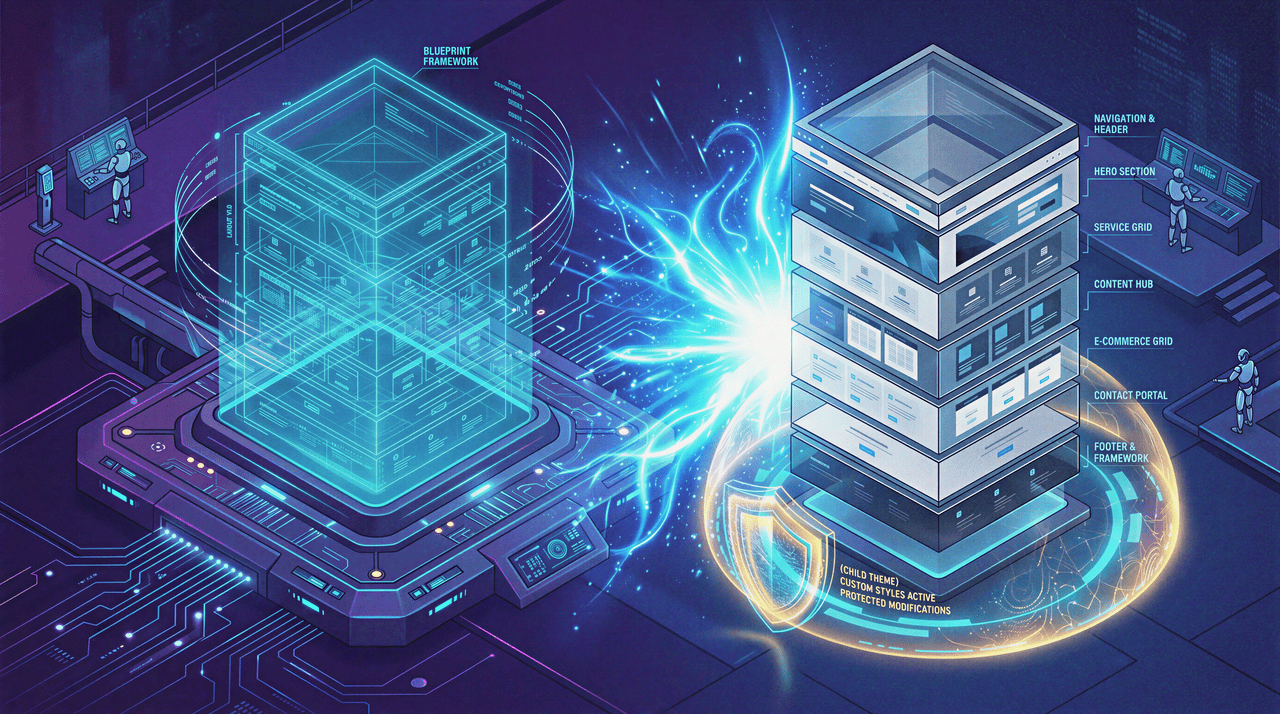
The best modern responsive themes do not just give you a terrifying blank slate.
They utilize a user-friendly interface to import fully built layouts with a single click.
Instead of staring at a blank screen and trying to guess where a hero image should go, you import a professional foundation and simply swap out the placeholder text with your actual marketing copy.
If you plan on making heavy code modifications to your new architecture, the platform fully supports the use of child themes.
This is a critical development best practice.
It ensures that when the parent theme inevitably receives future updates from the developer, your custom CSS styling and layout changes are never accidentally overwritten.
Step 3: Mastering Full Site Editing and Global Styles

Global Styles completely replaces the need for complex custom CSS.
You set your brand colors once and they apply everywhere automatically.
Once your new architecture is installed, you need to customize it to match your specific brand identity.
The recent native updates to the WordPress core make this process incredibly intuitive.
We have officially entered the era of Full Site Editing, where the front-end and back-end blend seamlessly.
Leveraging the Power of the Block Editor

The clunky classic editor is dead and gone, completely replaced by the modern block editor (often referred to as the Gutenberg Editor).
Instead of relying on rigid, unchangeable page templates, you build pages dynamically using flexible content blocks.
You can arrange text, images, columns, and buttons exactly how you want them on a visual canvas.
You do not need to install heavy, third-party header and footer builders anymore, which used to slow down sites dramatically.
Native template parts allow you to design a custom header visually, save it, and apply it globally across your entire domain.
If you want to change your logo size later, you edit the template part once, and it updates on every single page simultaneously.
Establishing Your Global Settings

Instead of manually changing the color of every single button across fifty different blog posts, you use the native Global Styles interface.
You define your core Global Settings before you ever start writing content.
You set your primary brand color. You pick your secondary accent color. You define your header styles.
When you establish these global rules, the entire site respects them instantly.
If your brand direction pivots and requires a dark-mode aesthetic instead of a stark white background, it takes exactly three clicks to deploy that massive change across your entire site.
Advanced Layouts Without Touching Raw Code

You can now fully utilize block patterns including the ones injected by third-party block plugins.
These are pre-designed groupings of blocks. You use them to instantly build complex “About Me” sections, team bios, or pricing tables without having to design them from scratch.
If you want to display your latest blog posts on your homepage in a beautiful masonry grid, you just drop in a query loop block and configure the settings.
If you need even more granular control over your layout design, plugin add-ons like Kadence Blocks expand the native editor’s capabilities dramatically, adding tabs, accordions, and advanced row layouts.
And if you have a highly specific technical requirement, you always have the option for raw code editing or using an AI website builder assistant tool to generate custom CSS right inside your panel.
You get pixel-perfect control without ever needing to download a raw PHP file or dig into your core website code via an FTP client.
Step 4: Enhancing Functionality with the Plugins Directory

Use this redesign phase to replace clunky external SaaS tools with native WordPress plugins for e-commerce and lead generation.
A spring site refresh is not just about making things look pretty. It is about significantly upgrading the engine that runs your business operations.
The most powerful part of this recent Automattic platform update is that your redesign can include massive functional upgrades without paying a developer thousands of dollars for custom builds.
You have the entire plugins directory at your disposal.
Upgrading Your Conversion and Marketing Engine

If you are still using a basic “Name and Message” contact form, you are actively losing money.
During your redesign, navigate to your plugins page and install the plugins that actually drive user action and capture leads or the ones that you specifically need.
Here are some example options to look at:
Add polite Pop-ups & Slide-ins to capture email subscribers before they bounce from your site.
Run A/B Testing on your new landing pages to see which headline or button color converts better with your specific audience.
Install the a content control plugin to restrict specific premium pages or resources to logged-in users or paying members only.
Use Dynamic Content plugins so your site displays different messaging based on where the user is geographically located, making your marketing highly personalized.
Adding Native E-Commerce and Payment Solutions

If your old site required clients to email you to schedule a consultation or ask for an invoice, use this redesign to completely upgrade your payment solutions.
You do not need to rely on clunky external platforms that charge massive transaction fees just to process a credit card.
You can add simple, highly effective ecommerce features natively.
Drop in a Donations Form if you run a non-profit organization.
Add secure Payment Buttons to sell blocks of consulting hours directly from your services page.
You can integrate Pay with PayPal and Stripe directly into your checkout flow, keeping the user on your domain the entire time.
To keep your backend dashboard clean and fast, you can even use Site-Specific Plugins to ensure your heavy ecommerce tools only load their JavaScript on the actual checkout pages, preserving your lightning-fast site speed everywhere else.
Step 5: The Pre-Launch Staging and Performance Testing Phase

Run your new design through Google PageSpeed Insights and test it physically on your smartphone before hitting publish.
You should never redesign your WordPress.com site and blindly hit publish without testing the mechanics.
A beautiful design is worthless if it takes ten seconds to load.
Checking PageSpeed Insights and Performance Optimization

Once you have your new third-party theme installed and your plugins configured, you must run a strict Performance optimization audit.
Run your new URLs through Google’s PageSpeed Insights.
If the score drops, you need to investigate.
Often, poor performance is the result of uploading massive, uncompressed images.
Ensure you are using a caching plugins and image compression tools to keep your load times under two seconds.
A fast site is non-negotiable for retaining website traffic and satisfying search engine algorithms.
Mobile Responsiveness and Web Accessibility

Over sixty percent of your website traffic will likely come from mobile devices.
Before you announce your spring site refresh, pull out your actual smartphone. Do not just rely on the desktop browser’s mobile preview.
Physically tap the navigation menus.
Check if the text is legible without zooming in. Ensure that your buttons are large enough to be easily tapped with a thumb.
Furthermore, run a basic web accessibility check.
Ensure your text colors have a high enough contrast ratio against your background colors so that visually impaired users can actually read your content.
The Advantage of Managed Infrastructure During a Major Redesign

Executing a major custom redesign on a cheap, unmanaged server is a terrifying experience.
I once installed a premium theme that conflicted with an old caching plugin. The entire server crashed for 4 hours before I realized what happened and fixed it.
You might encounter the dreaded white screen of death, and you are left digging through confusing error logs and begging for help in random Facebook Groups while your business stays completely offline, bleeding revenue by the hour.
This is exactly why I strongly advocate executing your spring site refresh directly on WordPress.com’s paid plans.
You get the absolute freedom of the open-source ecosystem, but you have an enterprise-grade safety net catching you if you fall.
Automattic’s massive server infrastructure handles the heavy lifting of domain management.
You get automatic, daily automated backups.
If you completely break your layout while testing a new CSS snippet, you can literally click a button and restore the site to how it looked yesterday.
They handle the SSL certificates, ensuring your client data is always encrypted over a secure connection.
More importantly, they manage the relentless security threats.
They automatically push critical security updates. They block malicious directory browsing attempts. They actively patch known vulnerabilities before hackers can exploit them.
If something does go catastrophically wrong, you have immediate access to a dedicated, expert support team, rather than being left to fend for yourself in a forum.
Your Immediate Next Step

You do not have to settle for a digital presence that embarrasses you during client pitches.
The artificial technical barriers that used to make redesigns miserable have been completely removed.
You have the tools to install any theme in the world to match your specific industry.
You have the access to manipulate your Global Styles visually without knowing how to write code.
You have the backing of 50,000+ plugins to add any complex functionality your business requires, all hosted on a secure, managed custom domain.
Stop losing high-paying clients to an outdated digital storefront.
Log into your dashboard, choose a premium architecture that matches your ambition, and execute your spring site refresh this weekend.
The tools are already waiting for you.