
Bluehost AI Builder
The standout AI builder that lets you describe a website in plain language, refine responsive pages through conversation, and publish it live on a subdomain for $0 to start, no credit card.
Artificial intelligence has completely reshaped how solo founders and creators launch web properties. Turning a plain-English idea into a multi-page website complete with structured copy, tailored sections, and responsive layouts now takes minutes rather than weeks.
Yet most founders still hit an irritating bait-and-switch. You spend twenty minutes prompting and refining a product landing page, only for the platform to throw up a checkout paywall the moment you click publish. Too many platforms advertise a “Free plan” when they actually mean an expiring sandbox that hides behind credit card verification before anyone on the internet can open your URL.
I spent the past few weeks building and publishing test sites across the most talked-about platforms to answer one practical question: Which AI website builders genuinely let you generate, customize, and publish a live website without entering payment details?
Below is my hands-on breakdown of the top five contenders alongside several notable AI tools that surfaced during testing, graded on real prompt intelligence, editing control, SEO basics, hosting architecture, and zero-dollar live publishing. If you want a step-by-step deep dive on my top pick first, you can also read my standalone Bluehost AI Builder review.
The Quick Comparison: 2026 Free AI Website Builders
Before inspecting each platform in detail, this pricing table summarizes the verified pricing info, hosting terms, and custom domain requirements across the main builders I tested:
| Platform | Price & Card Requirement | Free Publishing & Credits | Hosting & Support | Custom Domain Upgrade |
|---|---|---|---|---|
| Bluehost AI Builder | $0 to start, no credit card | Yes (live *.app.bluehost.ai subdomain); 5 credits/day (up to 30/mo), paid tiers 100–400/mo | Hosting included on all plans + 24/7 human help | paid plans from $20/mo |
| ZipWP | Free plan available (no card) | Temporary staging previews only; credit-based AI builds | Expiring sandbox hosting; docs/email help | Paid plan or external host |
| Wix AI Website Generator | Free plan with Wix ads (no card) | Yes (Wix-branded URL); unlimited page edits | Yes (500 MB cap); ticket/chat support | Paid plans from $17/mo |
| Squarespace AI | 14-day free trial (no card for trial) | No (requires paid plan to publish live) | No ongoing free hosting; 24/7 email/chat on paid | Paid plans from $16/mo |
| WordPress.com AI | Free plan available (no card) | Yes (*.wordpress.com); AI Assistant query caps | Yes (1 GB storage); community forums on free tier | Paid plans from $4/mo to $25/mo |
1. Bluehost AI Builder: Best Overall for Truly Free Live Publishing
Bluehost AI Builder
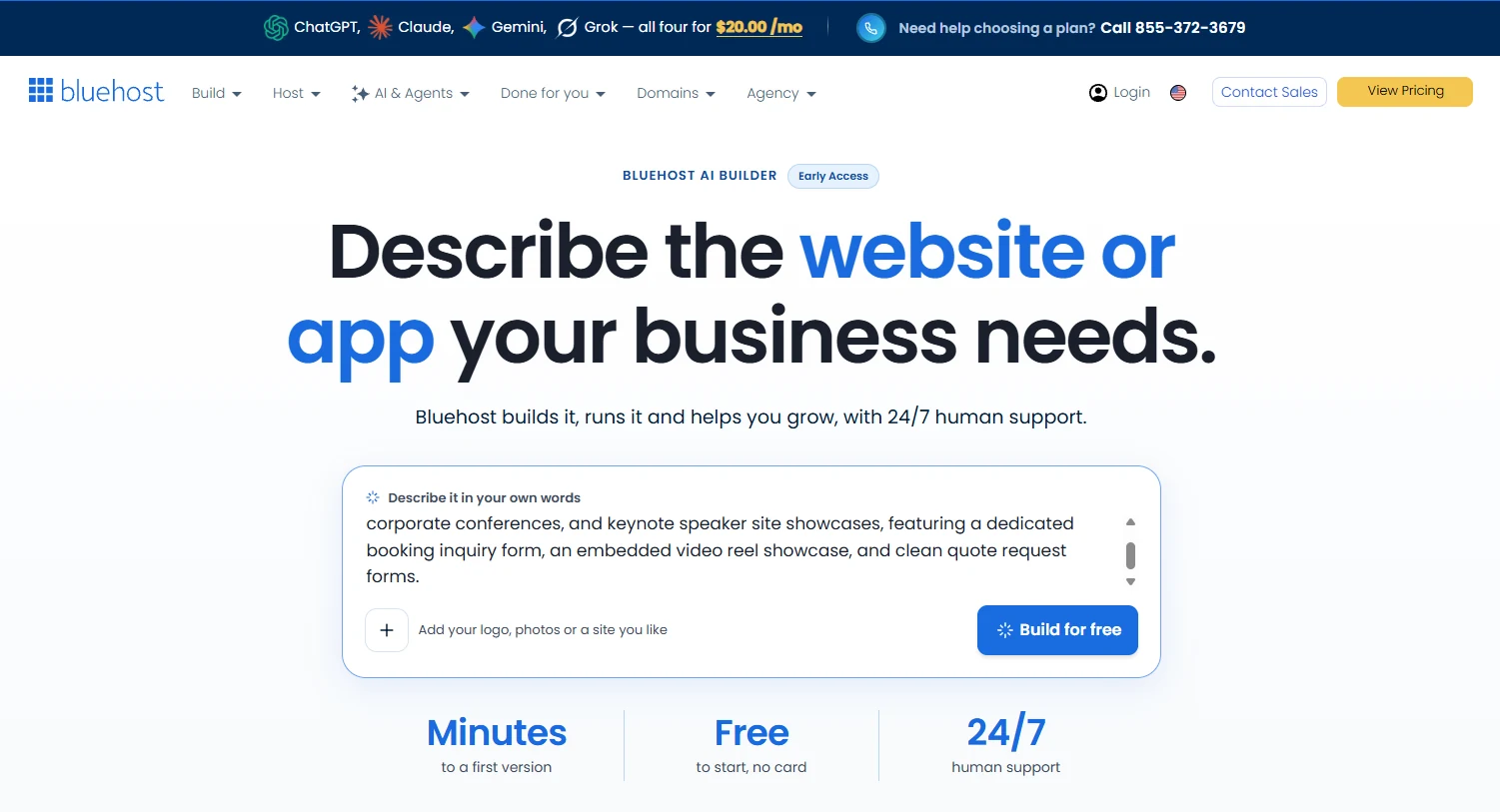
Score: 9.6 / 10 • Editor ChoiceBuilt as Bluehost’s modern prompt-to-site creation engine, Bluehost AI Builder replaces older rigid templates with a conversational workflow tailored around clear business goals. Instead of wrestling with complex dashboard menus or hunting for extra features you never asked for, you start from a single prompt describing what your business offers.
During my hands-on build for a sample event agency, I also appreciated the flexible visual inputs: you can upload your logo or photos (PNG, JPG, or WebP up to 5 MB), or paste a reference URL so the AI design assistance matches your preferred aesthetic. When a prompt is broad, the builder asks helpful clarifying questions to dial in typography, tone, and page structure.
Crucially, AI clarifying questions never consume credits. Only actual build and revision messages count against your daily balance.
Conversational Refinement, Sections, and Visual Editing
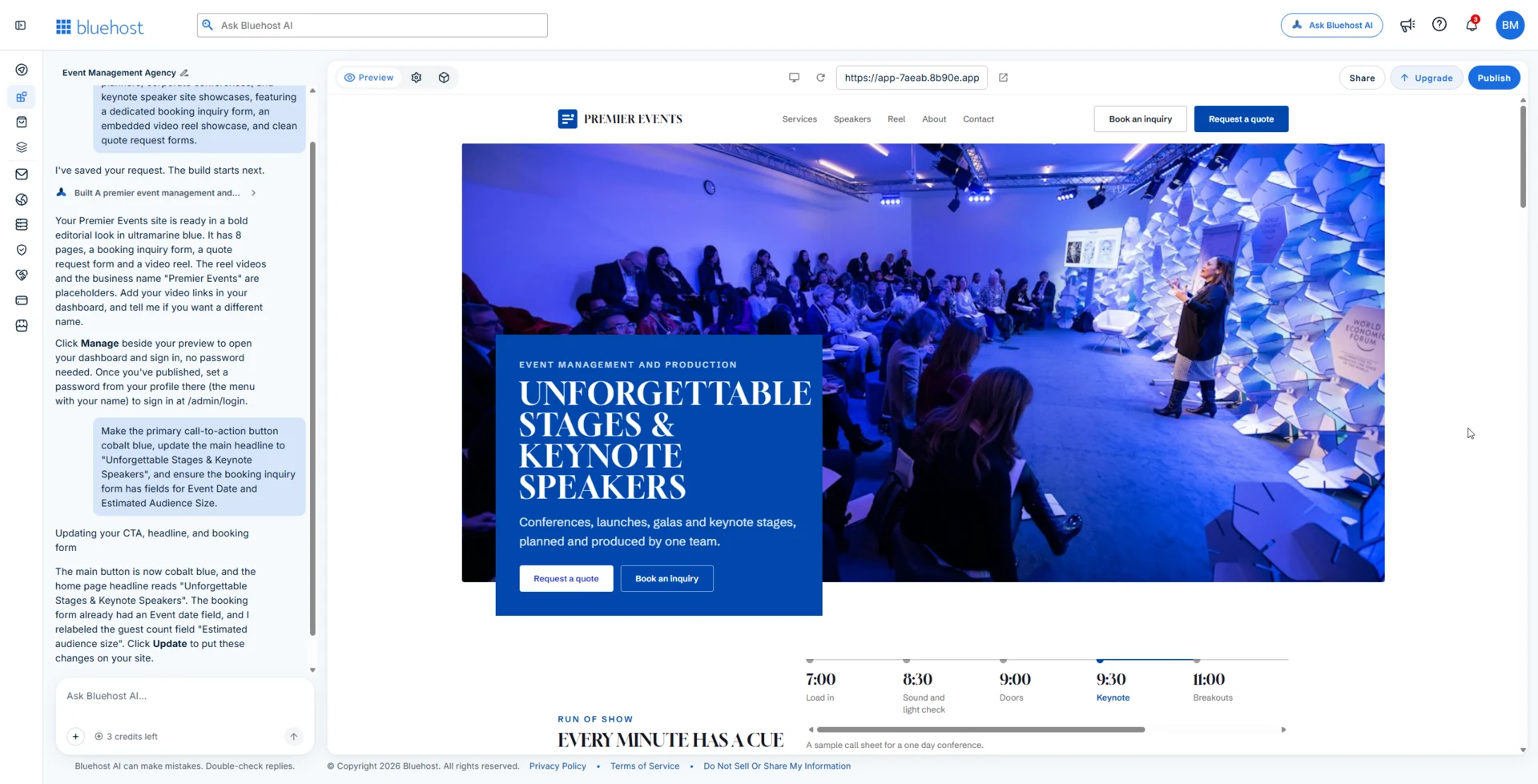
Instead of forcing non-technical founders through a cluttered drag-and-drop editor with fifty overlapping sliders, Bluehost AI Builder uses structured content generation and guided chat edits. My initial build produced an interactive hero, service breakdown, customer testimonials section, pricing info block, and a clean contact form in one pass.
Need a sharper headline or a different call-to-action on a product landing page? You ask in plain English (“rewrite my hero section for keynote speakers”) and inspect the updated layout immediately without risking broken spacing or managing Git branches and a pull request. To see how it compares to other creator-friendly options, read my guide on picking a scalable AI website builder.
Desktop, Tablet, and Mobile Optimization Check
Before hitting publish, I toggled between desktop, tablet, and mobile preview modes right inside the workspace. Checking responsive layouts across breakpoints makes mobile optimization and quick user testing painless, helping confirm the user experience holds up cleanly on narrow phone screens before you share the URL with prospects.
Credit System, Multi-Cloud Hosting, and Zero-Credit Safety
On the Free plan, you receive 5 credits per day (up to 30 credits per month), where each user prompt counts as 1 credit (unused credits and top-ups expire after 30 days). Even better, the platform runs on resilient multi-cloud hosting with built-in security layers and threat prevention included from day one, and hosting never uses credits.
Just as important, running out of credits never takes your published website offline. Visitors continue viewing your pages normally, and only new AI edit prompts pause until your daily/monthly allocation refreshes or you grab a top-up pack (50, 100, or 200 credits starting at $15). Free users also get access to 24/7 human customer service if they run into account questions.
Pricing Plans, Custom Domains, and Online Store Routing
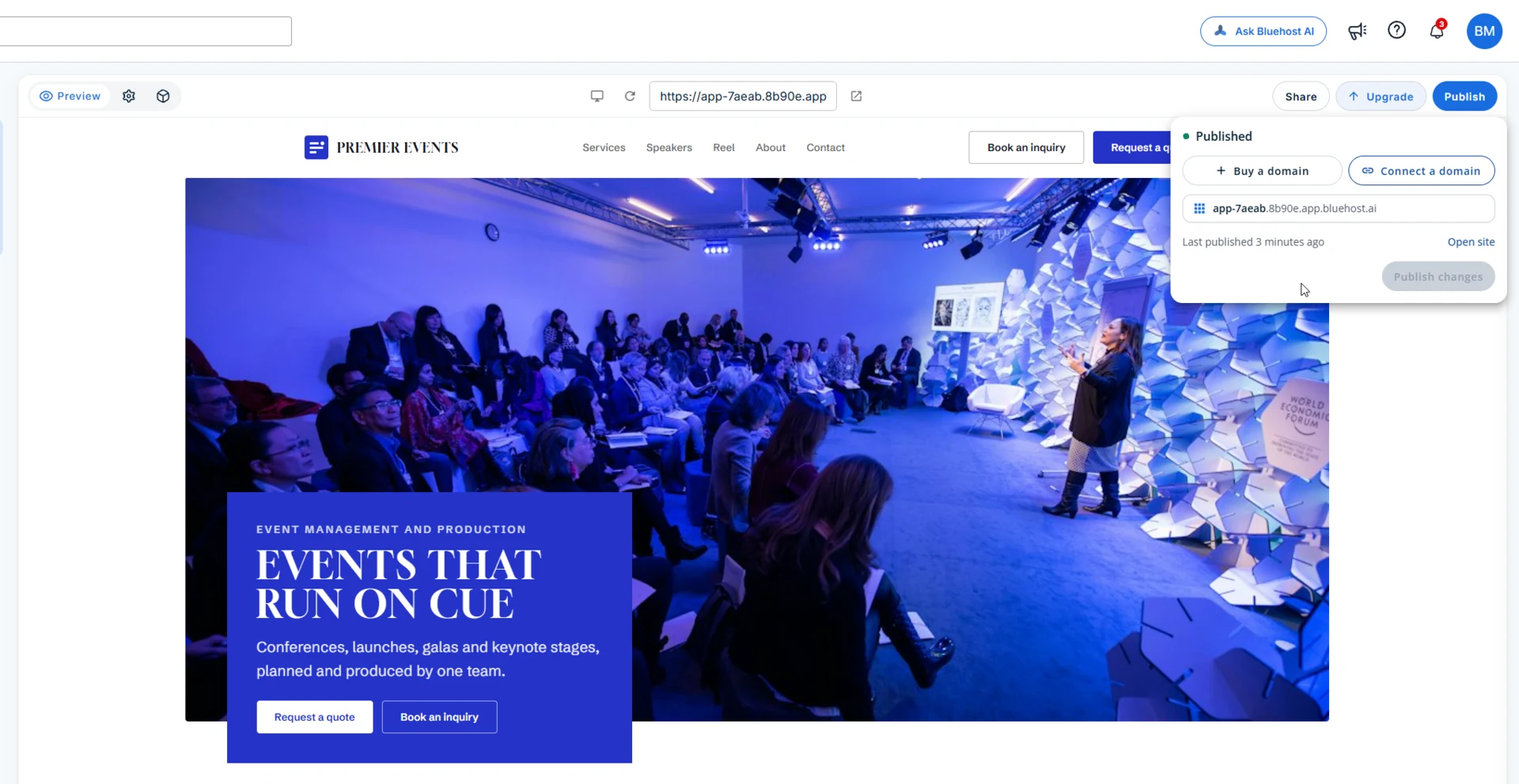
Getting started with Bluehost AI Builder is genuinely $0 to start, no credit card. Publishing places your live site on an active Bluehost subdomain (such as yourname.app.bluehost.ai) at zero cost.
When you are ready to connect a custom domain, you can upgrade to paid plans from $20/mo:
- AI Builder Free ($0): 5 credits/day (up to 30/mo), live subdomain publishing, hosting included.
- AI Builder Lite ($20/mo): 100 credits/mo and custom domain connection.
- AI Builder Standard ($40/mo): 200 credits/mo for growing brands and frequent updates.
- AI Builder Pro ($80/mo): 400 credits/mo and support for multiple websites.
Online Store & E-Commerce Boundary
Bluehost AI Builder is purpose-built for service businesses, creators, portfolios, and informational sites rather than transactional e-commerce. If your goal is launching a full online store with shopping carts, checkout flows, and a filterable product grid, Bluehost directs e-commerce builders to Bluehost AI Store (bluehost.com/ai-store).
*.app.bluehost.ai subdomain with zero credit card prompts.2. ZipWP: Fast WordPress Scaffolding, Temporary Free Hosting
ZipWP
Score: 8.8 / 10ZipWP approaches site creation differently by spinning up full WordPress installations in cloud sandboxes. You enter a prompt about your business, and within about a minute it provisions WordPress core along with starter block patterns ready for visual editing inside the native WordPress block editor.
Because it runs on real WordPress, you can later plug in dedicated SEO tools, custom WordPress contact form plugins, and full CSS controls once migrated to permanent hosting.
The Catch: ZipWP’s Free plan only generates temporary preview sites that expire unless you upgrade to paid hosting or export the site to your own server. Unlike Bluehost AI Builder, it does not serve as permanent zero-dollar hosting out of the box.
3. Wix AI Website Generator & Wix Studio: Deep Controls, Platform Lock-In
Wix AI Website Generator / Wix Studio
Score: 8.5 / 10The conversational Wix AI website generator pairs rapid onboarding with a pixel-level drag-and-drop editor. Once the AI lays out your homepage, color system, and initial sections, you can switch into manual drag and drop editing to adjust grids, embed scheduling software for bookings, or enable basic online store modules on paid tiers.
Wix also includes useful built-in SEO basics like editable meta tags, URL customization, and automatic sitemap generation, plus an app marketplace covering extra features like CRM widgets and Chatbot plugins.
The Catch: While Wix lets you publish on a free plan without a card, your site carries noticeable Wix-branded banners, a strict 500 MB storage ceiling, and a non-custom subdomain. Worse, Wix is a closed design system, so you cannot cleanly export your site code to another host if your business outgrows their pricing plans later.
4. Squarespace AI: Refined Visual Polish, No Ongoing Free Tier
Squarespace AI
Score: 8.2 / 10Squarespace weaves AI guidance into its Blueprint setup flow to help studios, portfolios, and consultants establish a cohesive design system fast. It pairs tasteful typography, curated stock imagery, and minimal grids cleanly, and lets you refine sections inside a tidy visual editor alongside built-in booking and commerce blocks.
The Catch: Squarespace does not offer a permanent Free plan. You only get a 14-day sandbox trial to experiment; clicking publish for real public traffic forces you onto paid pricing plans starting around $16/mo.
5. WordPress.com AI: Familiar CMS Backbone with Free-Tier Plugin Limits
WordPress.com AI
Score: 8.0 / 10
Automattic has layered AI content generation and block-level layout assistants into WordPress.com, giving writers and bloggers a familiar editing environment backed by strong global infrastructure. You get reliable semantic markup from modern block themes, built-in stats, and zero-hassle publishing on a *.wordpress.com subdomain. For a closer look at how Automattic’s tool handles real site builds, check out my WordPress AI website builder breakdown.
The Catch: On the Free plan, storage is capped at 1 GB, ads can appear on your pages, and you cannot install custom third-party plugins (including advanced SEO suites, third-party Chatbot plugins, or deep Google Analytics plugins) unless you upgrade to higher-priced Business plans. See my full WordPress.com vs self-hosted WordPress comparison before committing.
Other Notable AI Builders & Design Tools I Evaluated
While researching AI website builders across the 2026 landscape, several additional tools came up repeatedly for specific use cases. None of these replaced my top five for zero-cost multi-page publishing, yet understanding where each fits saves hours of trial and error:
-
Hostinger AI Website Builder: Includes handy conversion extras such as an AI Heatmap to predict visitor attention, a Business description writer, and AI Product descriptions for small shops. However, Hostinger is strictly a paid subscription builder rather than a permanent
$0publish-for-free platform. - Bookipi AI: Primarily tailored around freelancers who already use Bookipi for invoicing and simple appointment scheduling software. Bookipi AI can spin up a compact single-page presence quickly, though its page depth and design flexibility feel limited compared to Bluehost AI Builder or ZipWP.
- Appy Pie: Better known as a no-code generator for mobile wrappers and lightweight workflow widgets. Appy Pie handles basic template sites and simple automated workflows, yet its output feels more dated for content-heavy marketing sites and editorial blogs.
- Neo Sites: A quick one-page AI website add-on built mainly for startups setting up branded business email addresses. Neo Sites works as a basic digital business card, but lacks scalable multi-page layouts and advanced features as traffic grows.
- Figma Make: Ideal when designers want prompt-driven UI prototypes, a custom web app concept, or interactive component exploration inside an existing design system. Unlike hosted builders, Figma Make focuses on interface generation rather than turnkey cloud hosting, sitemap generation, or one-click domain connection.
What Truly Matters Beyond the Initial AI Prompt
Generating an attractive homepage in 45 seconds is the easy part now. After building test sites across all these platforms (including dedicated small-business layouts I cover in my AI website builder for small business guide), these four operational factors decide whether a free tool helps your business or traps you:
1. Live Subdomain Permanence vs. Expiring Sandboxes
Always verify whether clicking “Publish” actually puts your URL on the open web. Platforms that delete un-upgraded drafts after 48 hours waste your time if you just want to test positioning with clients. Having a persistent subdomain like yourname.app.bluehost.ai lets you run real user testing and refine copy at your own pace.
app-7aeab.8b90e.app.bluehost.ai right after publishing.2. Credit Lockout Behavior
Check what happens the moment you hit zero credits. Some tools freeze live pages behind maintenance notices until you subscribe. With Bluehost AI Builder, zero credits simply pauses future conversational edits while keeping your live site untouched and accessible to every visitor.
3. SEO Tools, Analytics & Technical Foundations
No website builder or AI tool can guarantee search engine rankings, as rankings always depend on search competition, authority, and helpful content. Still, your builder should handle technical SEO basics cleanly: editable meta tags, clean URLs, fast Core Web Vitals (see Google’s Web Vitals performance guide), automatic sitemap generation, clean semantic markup, and easy hookups for Google Analytics. Once you expand onto WordPress hosting or self-hosted setups, dedicated suites documented in my Rank Math SEO setup guide give you full keyword optimization control, alongside foundational practices in Google’s SEO Starter Guide and essential WordPress threat prevention practices.
4. Smooth Custom Domain & Scale Upgrade Paths
Starting free is great for validating an offer, building a portfolio, or launching a product landing page. Just make sure you are not painting yourself into a corner: confirm that connecting a custom domain, adding a contact form, or scaling traffic later is a clean upgrade step rather than a full rebuild from scratch.
The Final Verdict: Which Free AI Website Builder Should You Choose?
If your priority is launching a clean, mobile-friendly, multi-page website without paying upfront or entering billing details, Bluehost AI Builder is my top recommendation for 2026.
It pairs genuine $0 to start, no credit card onboarding with real conversational editing, free clarifying questions, included multi-cloud hosting, permanent subdomain publishing, and zero-credit safety so your live website never goes dark. When your brand is ready for a custom domain and extra credits, you can transition seamlessly to paid plans from $20/mo (or head to Bluehost AI Store if you decide to build a dedicated e-commerce storefront).
Start Building with Bluehost AI Builder for $0 →